
RavenDB vs MongoDB
RavenDB reduces work
MongoDB creates it
A Powerful, Secure, and Easy-to-Use NoSQL Database.


Why choose
RavenDB over MongoDB

Great default experience
Indexes are created automatically.
Certificate based security out of the box.
Simple installation defaults mean less configuration later.

Handles the complexity of data management
Intuitive SQL-like queries.
Standard JSON documents.
Server-side patching.
Scalable and performant
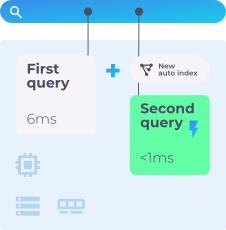
Queries are faster as they run on automatically created indexes, not raw data.
Multiple layers of client-side caching to make things ever faster.
Multi-master architecture makes choosing new cluster leaders instant when a node fails.
Great default experience
Indexes are created automatically.
Certificate based security out of the box.
Simple installation defaults mean less configuration later.
Handles the complexity of data management
Intuitive SQL-like queries.
Standard JSON documents.
Server-side patching.
Scalable and performant
Queries are faster as they run on automatically created indexes, not raw data.
Multiple layers of client-side caching to make things ever faster.
Multi-master architecture makes choosing new cluster leaders instant when a node fails.
RavenDB and MongoDB were both started around 2009 and on the surface, they are quite similar. Document databases using JSON with focus on performance, scalability and a modern approach for database design.
When you look beyond the surface, it turns out that they have very different design philosophies and vision about what a modern database should be. In this page, we'll discuss the differences between RavenDB and MongoDB, and their impact on your systems.

Quick Overview
Queries


Indexes
 Design philosophies
Reduce complexity of working with data, at any scale.
RavenDB focuses heavily on making things easy for developers and operators. RavenDB takes it upon itself to handle the complexity of data management for you.
RavenDB takes the approach that you don't need an expert at hand.
A core tenet of RavenDB's design philosophy is that you should be focused on getting things done, and the database engine will do the Right Thing for you.
Backend for extremely large-scale, cloud-based systems.
MongoDB focuses on enterprise solutions with high configurability and a high degree of flexibility, aiming to provide an answer to almost any scenario.
The drawback of this approach is that to operate a MongoDB database properly, you need a high degree of dedicated expertise to achieve good results.
For that reason, MongoDB recommends MongoDB Atlas (the cloud-hosted version) instead of running MongoDB directly.
Queries
 The first query
from Orderswhere ShipTo.City = 'London'
RavenDB uses an SQL-like language, intended to be familiar and intuitive for everyone. The query language was extended with document operations while keeping the ease of use and familiarity of SQL.
db.Orders.find({"ShipTo.City": "London"})
MongoDB queries are using a JSON-based format specific to the database. You'll need to familiarize yourself with the language to effectively use MongoDB.
 Efficient queries
No action is required on your part to ensure that the query will run fast.
The RavenDB query optimizer selects the best index for your query automatically.

db.Orders.createIndex({"ShipTo.City": 1})
Requires careful index management for good performance.
With MongoDB, it is the responsibility of the developers (or database administrators) to create the right set of indexes for the queries.
This is a delicate and complex task that requires deep insight into both the system and the database internals. Without careful attention to detail, it is easy to end up with very slow queries.
Fixing these sorts of issues can be costly and complicated.
 Queries evolution over time
Getting indexes right is a chore, but the real hurdle is when you need to evolve your system. When a new requirement is raised, how do we handle it?
Let's add sorting to the previous query, and see...
from Orderswhere ShipTo.City = 'London'order by OrderedAt desclimit 10
The work is completed
 // RavenDB adjusts itself for
// the new query on the fly

db.Orders.find({"ShipTo.City": "London"}).sort({ "OrderedAt": -1}).limit(10)
Some assembly required: you must manually create new compound indexes for added sorting or fields.
db.Orders.createIndex({"ShipTo.City": 1,"OrderedAt": -1})

 Aggregating data
Aggregating data is a common operation in most systems. It is also one of the most expensive operations you can perform in a database, processing vast amounts of data.
Let's explore how each database handles aggregation.
from Ordersgroup by ShipTo.Cityorder by count() descselect ShipTo.City, count()
The results will be near instantaneous, regardless of data size. RavenDB uses persistent Map-Reduce indexes to compute aggregations, so the computations happen in the background and are immediately available.
db.Orders.aggregate([{"$group": {"_id": "$ShipTo.City","Count": { "$sum": 1 }}},{ "$sort": { "Count": -1 } },{"$project": {"City": "$_id","Count": 1,"_id": 0}}])
In MongoDB, this query runtime is proportional to the amount of records, even if you have the appropriate index. The more Orders you have, the more costly this query is.
 Non-trivial queries
We have looked at very simple queries so far.
Let's see what happens as the application evolves and we look at more complex scenarios.
from Orderswhere (ShipTo.City = 'London' orShipTo.Country = 'Narnia')and OrderedAt between $weekAgo and$todayand Status in ('Ready', 'Pending')order by Total desclimit 10
Queries are natural to read and easy to write, even as the queries grow more complex.
db.Orders.find({$or: [{ "ShipTo.City": "London" },{ "ShipTo.Country": "Narnia" }],"OrderedAt": {$gte: _weekAgo$lte: _today},"Status": { $in: ["Ready", "Pending"] }}).sort({ Total: -1 }).limit(10)
Queries quickly become unwieldy to manage except for the most trivial of queries. MongoDB often uses just a single index for the query, and documentation recommends against relying on multi-index optimization.
MongoDB, beyond the more complex challenge, offers additional challenges. The query above touches several fields in the document.
Even if you created the right indexes, MongoDB will often use just a single index for the query. MongoDB's query optimizer is occasionally able to use multiple indexes to optimize a query, but MongoDB documentation recommends against relying on this behavior.
Indexes
Indexes allow a database engine to answer your queries in milliseconds instead of hours. RavenDB and MongoDB both use indexes to speed up queries, but there are a lot of differences between them.

Auto indexing
Expertise level: None, fully automated. An optimizer monitors queries and creates/removes indexes based on actual usage. No query is run without an index supporting it.
Expertise level: High, manual operation only. Depends on the DBA to manage the set of indexes.
 Indexes performance & scalability
Processes indexing in the background; writes complete successfully without waiting. Supports any number of indexes (hundreds) without performance issues.
Indexes are processed as part of the write operation. More indexes = slower writes. Hard limit of 64 indexes per collection.
 Index flexibility & usability
The manner in which each database can use its indexes is very different. Consider the following queries, common when users can choose their own sorting criteria.
from Employeesorder by LastName, FirstNamefrom Employeesorder by LastName desc, FirstName
A single index can be used for many different queries. Any field in the index can be queried and sorted individually or in combination.
db.Employees.find().sort({ LastName: 1,FirstName: 1 })db.Employees.find().sort({ LastName: -1,FirstName: 1 })
Sort order matters. A simple change in sort direction can force a full collection scan. Separate indexes are often required for each specific sort/query task.
db.Employees.createIndex({LastName: 1, FirstName: 1 })db.Employees.createIndex({LastName: -1, FirstName: 1 })
RavenDB's indexes are built in such a way that a single index can be used for many different queries. This significantly reduces the resources that RavenDB needs to handle your workload.
Any field in the index can be queried and sorted individually or in combination with other index fields, meaning that a single index in RavenDB serves double or even triple duty compared to indexes in MongoDB (or even relational databases).
The structure of an index in MongoDB means that sort order matters. It's easy to write a query that uses an index and later make a simple change (such as the sort direction), which will force MongoDB to perform a full collection scan (a very slow operation).
As usual, a high degree of expertise, care, and attention is required to build effective applications using MongoDB.
Aggregations
- RavenDB can move aggregation costs into the background, pre-computing the required information and massively speeding query time.
- RavenDB's Map-Reduce indexes allow queries to return near-real-time data instantly, regardless of the data size involved.
- MongoDB can utilize indexes during aggregation queries, but still needs to execute the aggregation at query time.
- As the size of the data grows, the slower such queries become. Optimizing aggregation queries in MongoDB is a task for experts.
Full text search
- Fully supported out of the box. No third party integration required.
from Postswhere search(Title, 'awesome')
- Allows faceting, typo correction, highlights, and geo-spatial queries on existing nodes.
Basic support with many limitations. A typical solution requires integrating Elasticsearch. Atlas Search is not available for local deployments and incurs additional costs.
Vector Search
RavenDB treats vector search as a core capability. It uses its Corax search engine to handle high-dimensional vectors. Everything, from embedding generation to indexing and storage, happens inside the database itself.
MongoDB Atlas Vector Search is architecturally a separate service that runs alongside the core database. While it appears seamless via the API, it often involves dedicated Search Nodes in the cloud to handle the heavy lifting calculations.
Indexing computed values
- RavenDB allows you to compute values during indexing, such as deriving the total value of an order by summing up its line items.
- You can also integrate additional services, such as machine learning, during the indexing process.
- RavenDB allows you to integrate with package managers to run custom code during the indexing process easily.
- MongoDB has no support for computing values during the indexing process.
- MongoDB recommends that you write computed fields directly into your documents (and ensure that they are updated on every write) instead of computing them at indexing time.
Operations
Securing your data
Your database contains the most valuable parts of your system. Protecting your data is a primary concern for your business.
Secured by default. Refuses to run in an unsecured mode. Uses X.509 certificates and Zero Trust assumptions. If RavenDB runs, it is running securely.
Runs without any authentication by default. Setting up securely is complex and error-prone (100+ page document). Tens of thousands of instances have been affected by ransomware.
Distributed work and sharding
RavenDB and MongoDB can both run in a cluster, for scalability and high availability reasons. They take a very different approach on the actual mechanics of that.
Uses a multi-master model. Nodes are homogenous and interchangeable. For clustering purposes, the Raft consensus protocol is used. Sharding recommended beyond the 5 TB range.
Uses a single primary/multiple secondary model. Writes must go to the primary node. Complex components (config servers, routers, shards). Write scaling requires sharding at the 200 GB mark.
 Failover & high availability
RavenDB and MongoDB both offer automatic failover when an error occurs. There are practical and important differences in the way the databases handle failure.
Detects failure and selects a new leader in under one second. Clients failover transparently to the application.
Primary failure means write downtime (often 10+ seconds). Reads fail by default unless specific readConcern settings are used.
Patching documents & migration
Your applications grow over time, and data models change.
Let's see how each database allow you to modify your documents and evolve their structure.
from Employees as emp update {emp.Name = emp.LastName + ”,“ + emp.FirstName;delete emp.FirstName;delete emp.LastName;}
Allows modifying JSON documents en masse using simple JS scripts inside the database engine. No network traffic required.
// not possible, you need to write
// a full blown program for this
updateMany() is limited. Changes based on a document's own data (e.g., unifying name fields) require writing a separate program to load, modify, and save.
 Operational overhead
Automatically caches all read operations. Saving data is ACID compliant. Built-in monitoring, alerts, and performance hints reduce the need for high expertise.
Leaves caching management to the user. Transactions are opt-in. Relies on administrators to manually analyze query patterns and optimize indexes.
Open source
Open Source project with an OSI-approved permissive license.
Changed license in 2018 to Source Available; no longer an Open Source project.

MongoDB was meant to be a backend database for a Platform as a Service product.
RavenDB was envisioned to be a database that lets developers get things done.
MongoDB was meant to be a backend database for a Platform as a Service product.
RavenDB was envisioned to be a database that lets developers get things done.



Thousands of customers have chosen RavenDB
Trusted by 12,000+ customers across the globe


































See how we compare to other databases

Get started in minutes
Download free and experience the difference for yourself.