Four Ways RavenDB Just Made Your Life Easier
Highlights
- Sign in to RavenDB Studio with Google, GitHub, Microsoft Entra ID, or Windows Kerberos.
- Pull Azure Service Bus messages directly into RavenDB without writing consumer code.
- Use ETL and AI Task Health views to spot pipeline issues faster and understand where they failed.
Most of what makes a database hard to run isn't the database. It's everything around it: the credentials you provision, the glue code you maintain, the error messages you decode at the worst possible time. We've been chipping away at exactly that.
Today we're releasing four capabilities aimed squarely at that layer.
Sign in with the identity you already have
Until now, getting into RavenDB meant working with X.509 certificates. They set a very high bar for trust, which is exactly why we used them, but they're safe rather than easy: every new user needed a certificate and had to be walked through installing it.
Now RavenDB Studio authenticates against identity people already have. Sign in with a Google, GitHub, or Microsoft Entra ID account, or authenticate through Windows Kerberos for domain environments. Authentication happens at your identity provider, so password policies, MFA requirements, and access revocation all live where your security team already manages them.
What this changes in practice:
- Onboarding a developer means granting access, not issuing and installing a certificate
- Offboarding happens at the identity provider, and access is gone everywhere
- Your security review has one less standalone auth system to explain
Learn more: SSO setup
Pull messages from Azure Service Bus straight into your database
If your services already publish events to Azure Service Bus, getting that data into your database usually means writing a consumer: something that listens to the queue, parses each message, and turns it into a database write. Another piece of infrastructure to deploy, monitor, and keep alive.
RavenDB now does that for you. With the Azure Service Bus sink, RavenDB listens to your queues and topics, runs a script on each message, and stores the result as documents. Messages land in your database as data you can query, index, and work with, no consumer code in between.
This extends RavenDB's existing Azure messaging support. You could already send data out to Azure Queues; now you can pull data in from Service Bus. And because the sink writes transactionally, a batch either lands completely or not at all, so you don't end up with half-processed messages.
Learn more: Azure Service Bus sink
Know why a pipeline broke before you start digging
Here's what troubleshooting a broken ETL used to look like: a notification tells you something failed, hands you a raw error message, and wishes you luck. Is the whole pipeline down or just skipping documents? Is it the configuration, the transform script, or the destination? You find out by digging.
The ETL & AI Task Health views turn that dig into a lookup. When something goes wrong, you get structure instead of a wall of text:
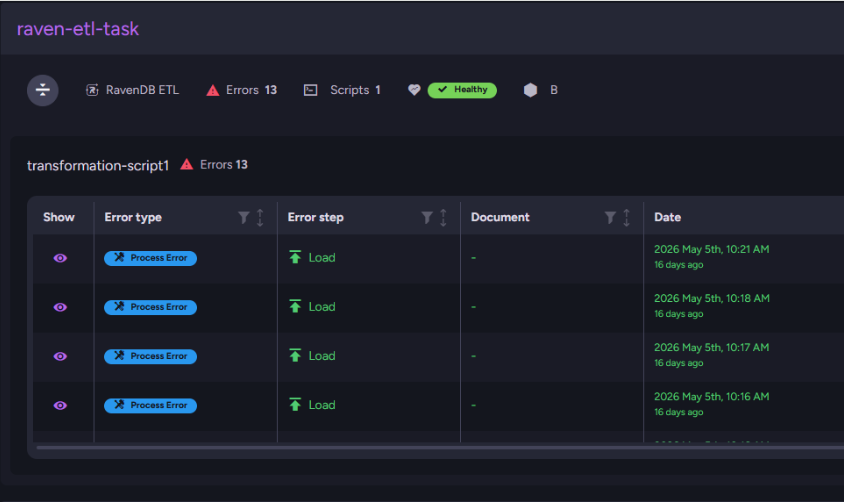
- The error type tells you the scope. A Process Error means the pipeline itself stopped working. An Item Error means the pipeline is running but skipping specific documents. That one distinction immediately points you at either your configuration or your data.
- Failure stage narrows it further. Errors are categorized by where the pipeline broke: configuration, transformation logic, or connectivity to the destination. You start the investigation knowing which part to open.
- Health status ranks urgency. Every task with errors gets a status showing whether it's healthy, hiccuping occasionally, or failing badly enough to threaten operation. When multiple pipelines have issues, you know which fire to fight first.
The same signals are exposed as monitoring metrics, so systems like Zabbix can watch your pipelines and alert you before missing data reaches your users. We've published a review built on real-life scenarios that shows how to use the views to diagnose problems fast.
Learn more: ETL & AI Task Health
Define a connection once, use it everywhere
If you run many databases, you know this chore: the same connection defined again and again, once per database. Twenty databases talking to the same destination means twenty copies of the same definition, and twenty edits when anything changes.
Server-wide connection strings end the repetition. Define a connection once at the server or cluster level, and every database on it can use that definition. When the destination changes, you update one place, and you're done.
For multi-tenant environments, this is a real operational shift. A tenant-per-database architecture with shared destinations no longer means connection sprawl. New databases inherit what's already defined, and your ETL and ongoing tasks reference connections that live in exactly one place.
Learn more: server-wide connection strings
All of this is in RavenDB 7.2.5
Everything above is available today. Download the new version, and it's yours.
Cloud customers will be upgraded automatically per their update schedule. Full details are in the release notes.
Frequently Asked Questions
How does the Azure Service Bus sink simplify data ingestion?
It enables RavenDB to listen directly to your Azure Service Bus queues and topics, run a script on incoming messages, and save them as queryable documents. This eliminates the need to write, deploy, and monitor custom consumer code.
How does the new Single Sign-On (SSO) feature improve developer onboarding and offboarding?
Previously, granting access required manually issuing and walking new users through installing X.509 certificates. With SSO, onboarding a developer simply means granting them access via your existing identity provider. When offboarding, access is revoked directly at the identity provider.
What problem do server-wide connection strings solve?
Previously, if multiple databases needed to talk to the same destination, you had to manually define the connection for each individual database. Now, you can define a connection just once at the server or cluster level. Every database can inherit this single definition, significantly reducing configuration sprawl.
Woah, already finished? 🤯
If you found the article interesting, don’t miss a chance to try our database solution – totally for free!