Short introduction to data modeling in non-relational database
Highlights
- Data modeling in a NoSQL database requires rethinking relational structures
- Denormalization improves query performance and reduces indexing complexity
- Copying SQL models directly leads to inefficient queries and design issues
Data modelling
Data modeling is the first and most important step in NoSQL database management. Proper structuring of documents and skillfully crafted relations make life easier. Special care should be paid towards the fact that relational databases are very different from NoSQL document ones. If you port over a project from SQL to NoSQL, remodeling of the data is needed. Importing the data model from relational to non-relational database without modifying it is, in most cases, a bad idea.
Example data model
Let’s take a look at an example of why even a small change in the data model can have a significant impact on database management.
In the relational database, our data consists of two tables – University and Student with one-to-many relationship between them – students can only enroll in one university, but each university can have multiple students.
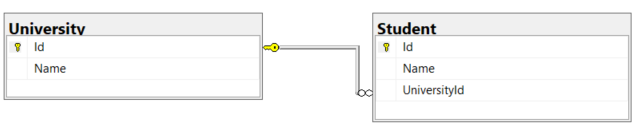
Our goal is to query students by the name of their university.
Replicating the relational model
Previously shown model can be imported directly into RavenDB as University and Student collections represented by the following C# classes.
private class University
  {
      public string Id { get; set; }
      public string Name { get; set; }
  }

private class Student
  {
      public string Id { get; set; }
      public string Name { get; set; }
      public string UniversityId { get; set; }
  }
Because of the RavenDB design, we have to perform the necessary computation during the indexing stage. The motivation for this is to avoid an expensive full scan that would need to be performed in order to execute such a query.
The solution in RavenDB is to create a static map index with the usage of the LoadDocument method to handle the relationship between University and Student documents. It allows us to create index entries containing data from documents placed in both collections.
Map indexes are explained in more detail in RavenDB documentation.
Our index has the following definition.
public class Students_ByUniversityName : AbstractIndexCreationTask<Student, Students_ByUniversityName.IndexEntry>
  {
      public class IndexEntry
      {
          public string UniversityName { get; set; }
      }

      public Students_ByUniversityName()
      {
          Map = students => from student in students
              let university = LoadDocument<University>(student.UniversityId)
              select new IndexEntry
              {
                  UniversityName = university.Name
              };
      }
  }
When indexing Student documents, we additionally load related University document, so we have access to all its fields. It means we can index them, and perform queries on them later.
We can now store some example documents, create and execute the index and finally query students by their university name.
using (var store = GetDocumentStore())
  {
      using (var session = store.OpenSession())
      {
          var university1 = new University() { Name = "University of Cambridge" };
          var university2 = new University() { Name = "University of Oxford" };

          session.Store(university1);
          session.Store(university2);

          var student1 = new Student() { Name = "James", UniversityId = university1.Id };
          var student2 = new Student() { Name = "John", UniversityId = university2.Id };
          var student3 = new Student() { Name = "Robert" };

          session.Store(student1);
          session.Store(student2);
          session.Store(student3);

          session.SaveChanges();

          var studentsByUniversityName = new Students_ByUniversityName();

          studentsByUniversityName.Execute(store);

          WaitForIndexing(store);

          var cambridgeStudents= session.Query<Students_ByUniversityName.IndexEntry, Students_ByUniversityName>()
              .Where(x => x.UniversityName == "University of Cambridge").OfType<Student>().ToList();
  	}
  }
In our query we used the Where clause to select only students from the University of Cambridge. Additionally, we used the OfType method to deserialize our results to the Student type.
This relatively simple index allowed us to get the query results we wanted. However, we can take a slightly different approach to our task and come up with an even better solution.
Adjusting the data model
Instead of trying to replicate the relational model, we can modify it to take the full advantage of a non-relational database.
We can adjust our data model to take the following form.
private class University
  {
      public string Id { get; set; }
      public string Name { get; set; }
  }

private class Student
  {
      public string Id { get; set; }
      public string Name { get; set; }
      public string UniversityId { get; set; }
      public string UniversityName { get; set; }
  }
We took advantage of a technique called denormalization. Denormalization is an approach to handle relationships that’s not suitable for relational databases, but can be useful in document databases in many cases. The idea is simple – instead of storing entities as separate documents in two collections, we can embed one of them into another – using either all its fields or just some of them.
In our case we embedded the Name field of University documents into the Student collection under the UniversityName name, additionally to storing the UniversityId field. This allows us to make sure stored university name won’t change and maintain the reference to actual University document.
We can again store some example documents and immediately query them.
using (var store = GetDocumentStore())
  {
      using (var session = store.OpenSession())
      {
          var university1 = new University() { Name = "University of Cambridge" };
          var university2 = new University() { Name = "University of Oxford" };

          session.Store(university1);
          session.Store(university2);

          var student1 = new Student() { Name = "Student1", UniversityId = university1.Id, UniversityName = university1.Name };
          var student2 = new Student() { Name = "Student2", UniversityId = university2.Id, UniversityName = university2.Name };
          var student3 = new Student() { Name = "Student3" };

          session.Store(student1);
          session.Store(student2);
          session.Store(student3);

          session.SaveChanges();

          var studentsOfCambridgeUniversity = session.Query<Student>()
              .Where(x => x.UniversityName == "University of Cambridge").ToList();
  	}
  }
Notice that this time we don’t have to create an index. When we execute a query by the UniversityName, RavenDB creates AutoIndex that will be used for this, and all future queries by this field.
Conclusions
In the first example, every time a document in the University collection has its Name property modified, each index entry with the same UniversityName will be modified accordingly. In the second example, the UniversityName property of documents in the Student collection won’t be modified when we modify documents in the University collection. That’s why we should always decide if we want our data to be modified in such situation or not.
Each project has its own priorities, which makes it impossible to find one, perfect solution for data model design. You should always start the development of your project from setting its priorities, as it may heavily impact the data model. For example, if from the perspective of your project queries aren’t too important, you can simplify your data model, including index definitions, making a trade-off for more complicated queries.
Frequently Asked Questions
What type of non-relational database is RavenDB?
RavenDB is a modern Document Database and a NoSQL database platform. It stores data as flexible JSON documents rather than fixed tables, allowing developers to work with complex, evolving data structures more easily. RavenDB also includes built-in features like indexing, querying, and ACID transactions.
How does RavenDB handle schema validation for its document models?
While document databases offer flexible data modeling, RavenDB allows you to enforce structure and rules using JSON Schema Validation.
Can I model and store time-based data efficiently?
Yes, RavenDB provides native support for Time series data, allowing you to store, query, and aggregate timestamped data directly alongside your documents.
Woah, already finished? 🤯
If you found the article interesting, don’t miss a chance to try our database solution – totally for free!