Skip to Navigation
Using NuGet Packages to Power Up RavenDB Indexes

In RavenDB 5.1, you can now use third-party NuGet packages and load binary data (or “attachments”) within your indexes without any additional code deployment necessary.
In this article, I’ll showcase how to use these two features together to index EXIF metadata on images and run ML.NET sentiment analysis offline on product reviews.
What Makes RavenDB Indexes So Powerful?
In traditional NoSQL or RDMS databases indexing is usually an afterthought until queries slow down. In RavenDB, you cannot query without an index which makes your app fast by default. Traditional indexes are just lookup tables. In MongoDB, the aggregation pipeline can perform Map-Reduce operations but pipelines are executed by the client code at a point in time.
In contrast, RavenDB indexes can perform complex operations that combine the benefits of MongoDB’s aggregation pipeline with the power of RDMS-style queries. Since indexes are built in parallel in the background, queries respond in milliseconds even under high load. This makes RavenDB one of the fastest NoSQL databases on the market.
For a deeper dive, learn what role indexes play in RavenDB compared to MongoDB and PostgreSQL.
Indexing Image EXIF Data Using Attachments
Imagine a photo gallery web app. If you want to show the date a photo was taken, you need to read its EXIF metadata. EXIF data is stored in the image binary and follows a specific structure.
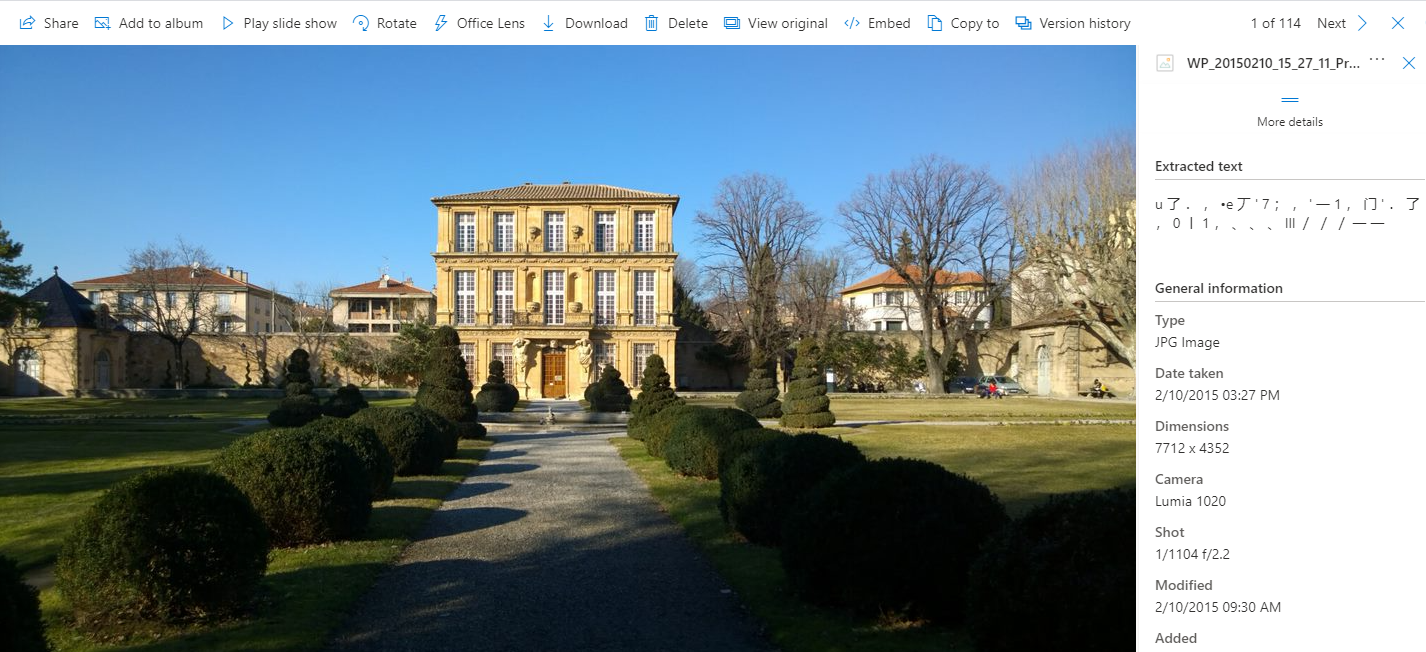
In a sophisticated app, the EXIF data can be read when the user uploads the image, asynchronously, and then saved back to the database for lookup later. This is fine but it also requires application code, not to mention services to handle the queuing infrastructure.
Why go to all that trouble for simple use cases? We can tackle this without any custom code in RavenDB. Follow along yourself in the Live Test Playground where anyone on the Internet can play with RavenDB and make databases.
To upload a binary file, you can “attach” it to a document just like you would an email. In the Studio interface, I’ll add a photo document with a few fields like the photo title and description:
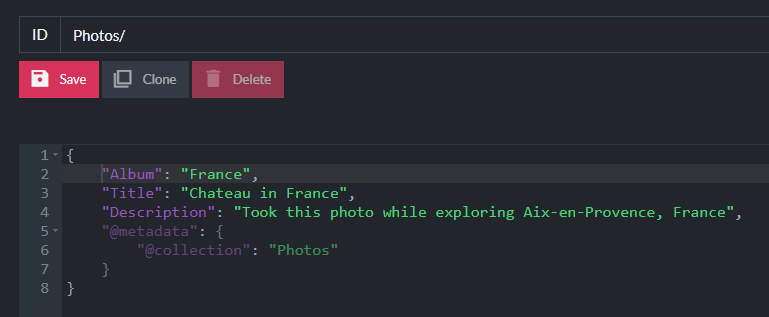
Once the document has been created, I can attach my photo. When I lived abroad in France, I took a photo of a garden in front of a chateau in Aix-en-Provence:

I’ll attach that image using the sidebar in the Studio:
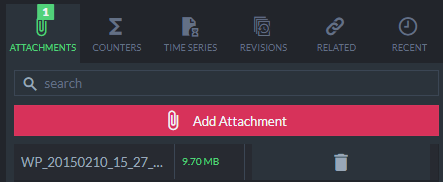
For storing binary files in MongoDB, you have to decide between using BinData or using GridFS. In RavenDB, you have one choice. There’s no limit to attachment file size and they are stored separately from the document so they do not affect query performance.
Now, I’ll create an index named Photos/WithExifAttributes:

RavenDB indexes are defined C# or JavaScript and can be queried using Raven Query Language (RQL) which supports invoking C# or JavaScript functions respectively. Since I showcase NuGet in these examples, I’m using C# indexes.
This will be a Map index, meaning we load data from a document and “select” fields that we want to query on. These fields are used for filtering in “where” clauses when querying.
Using the new Attachment Indexing helpers to load the list of attachments and retrieve the reference to the photo, I’ll select its file name and size to query on:
  from photo in docs.Photos
  let attachment = LoadAttachment(photo, AttachmentsFor(Photo)[0].Name)
  select new {
    photo.Title,
    attachment.Name,
    attachment.Size
  }
This is madness! Can we just stop for a moment and acknowledge that it’s so cool we can load the photo while indexing and have full access to it?
I’ll issue a query and filter by the photo title:
  from index 'Photos/WithExitAttributes'
  where Title = 'Chateau in France'
The Studio interface can show “raw” index entries which reveal the photo filename and size:
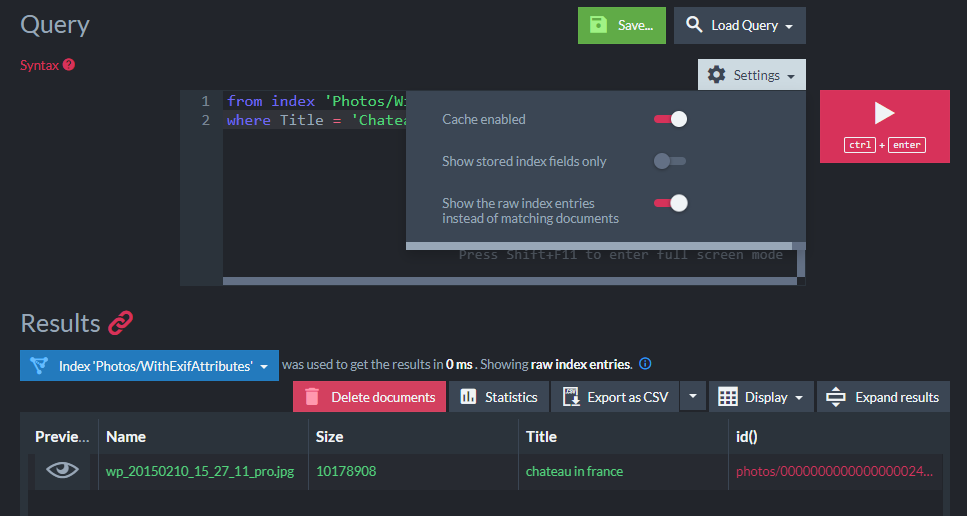
The query took 0ms since indexes are built in the background enabling RavenDB to respond to queries instantly.
Now I’ll kick it up a notch. In the index definition, I will add a NuGet package under “Additional Assemblies” for the MetadataExtractor package which supports reading EXIF metadata:
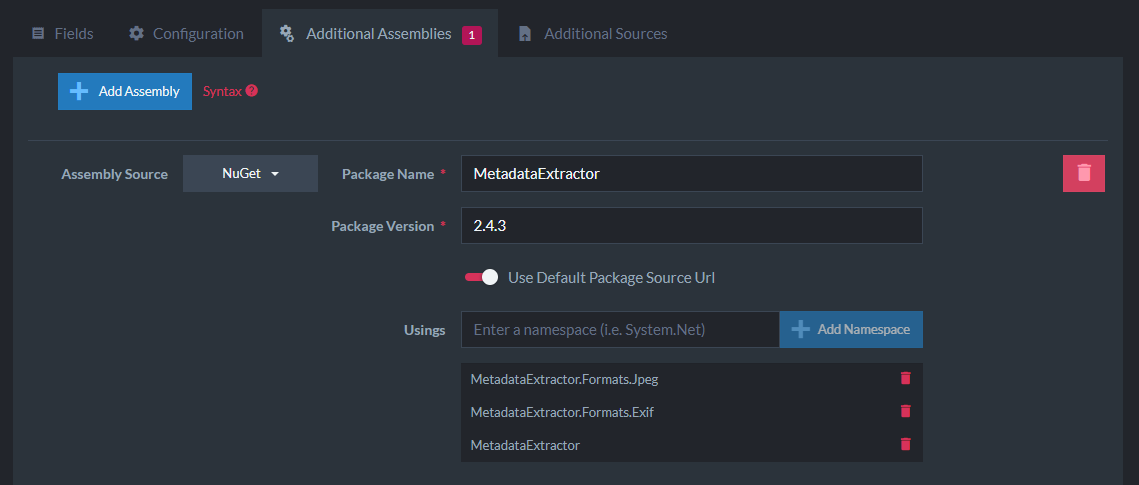
I added some usings needed for running the MetadataExtractor. When writing any amount of complex indexing code, you can leverage the Additional Sources feature to upload source code files like C# or JavaScript and call functions directly from the Map/Reduce operations. These files have complete access to any NuGet packages you’ve added. That way you can use tooling to make sure your code works before trying to use it within an index and it encapsulates any complex logic to keep your index simpler. I won’t be doing that in this demo just for clarity on how the index is working.
Now I can reference APIs from the MetadataExtractor namespaces in my index code. The steps roughly are to:
- Get the attachment data as a
Stream - Read the image metadata into a “directory structure”
- Open the EXIF Sub IFD directory which holds some useful metadata
- Get the date the photo was taken
EXIF metadata is a little intimidating to understand but some explanations are available. Different metadata properties are available in different “directories.”
I’ll walk through the index code step-by-step:
  from photo in docs.Photos
  let attachment = LoadAttachment(photo, AttachmentsFor(photo)[0].Name)
  let directories = new DynamicArray(
    ImageMetadataReader.ReadMetadata(attachment.GetContentAsStream()))
  let ifdDirectory = directories.OfType().FirstOrDefault()
The first step is to load the attachment data using attachment.GetContentAsStream() which I pass to the ImageMetadataReader.ReadMetadata static utility. This will return an enumeration of “directories” as MetadataExtractor calls them (it’s a tree structure).
The new DynamicArray expression is a class RavenDB uses that wraps an enumerable so that you can safely perform dynamic LINQ operations. The OfType<ExifSubIfdDirectory> LINQ expression retrieves the first metadata directory matching the EXIF Sub IFD directory type.
Next, I get the date the photo was taken as DateTaken:

  from photo in docs.Photos
  let attachment = LoadAttachment(photo, AttachmentsFor(photo)[0].Name)
  let directories = new DynamicArray(
    ImageMetadataReader.ReadMetadata(attachment.GetContentAsStream()))
  let ifdDirectory = directories.OfType().FirstOrDefault()

  let dateTime = DirectoryExtensions.GetDateTime(ifdDirectory, ExifDirectoryBase.TagDateTimeOriginal)
  select new {
    DateTaken = dateTime,
    photo.Title,
    attachment.Name,
    attachment.Size
  }
You’ll notice I am using LINQ’s FirstOrDefault() method which can return a null value for ifdDirectory. Indexes in RavenDB are resilient to errors and what happens behind the scenes is some magic that will add null propagation when accessing any values that could be null. This avoids any NullReferenceException issues that could cause indexing to fail. I wish I had a null propagation fairy in my regular .NET code!
I use the DirectoryExtensions.GetDateTime static method to retrieve the photo’s “original date” field. Images can contain a lot of different date-time fields and it is not consistent between file formats. For this photo, the TagDateTimeOriginal field holds the timestamp the photo was taken so I am using that.
I can now query photos by date! RavenDB supports date range queries when filtering by a date field so I can use the filter expression:
where DateTaken between '2015-01-01' and '2015-03-01`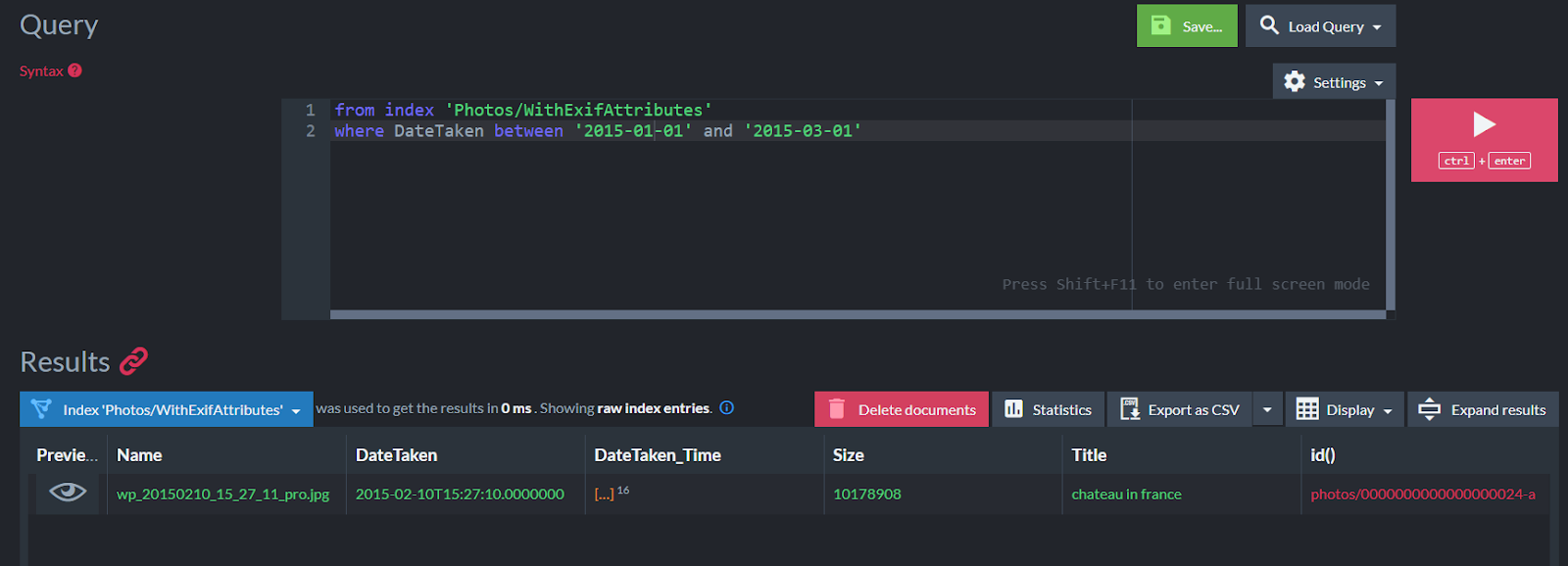
This will bring back my photo that was taken during that date range.
Just to summarize everything we managed to do without any application code:
- Upload a photo to the database and associate it with a document
- Create an index to query the EXIF image data with the following steps:
- Load the photo during indexing
- Load a third-party NuGet package assembly
- Read the image metadata using the API
- Add the EXIF metadata as additional fields in the index
- Query documents by date taken
All of that and the queries are instantaneous.
I can tell you right now: MongoDB can’t touch that. 🔥
User Review Sentiment Analysis with ML.NET
Let’s change gears now and examine how we could leverage some offline machine learning to index the sentiment of user reviews. “Sentiment analysis” is classifying text as positive, neutral, or negative. Sounds simple but it’s complicated stuff!
In a sentiment analysis machine learning program, the rough steps would be to:
- Obtain a source dataset of values
- Train the AI model on the dataset
- Use the trained model to perform sentiment analysis against new data
Steps 1 and 2 can take a while to perform if the dataset is large as it runs a learning algorithm on it. Step 3 is much faster as it can use the trained model to analyze a limited dataset, like a single product review. It is beyond my ability to explain this in detail but luckily ML.NET has some great documentation to reference on using trained offline models with TensorFlow.
I’ll be using the NuGet package SentimentAnalyzer to run an offline analysis with a pre-trained model included within the package. The benefit of this is that we aren’t incurring the cost of training every time the indexing operation runs.
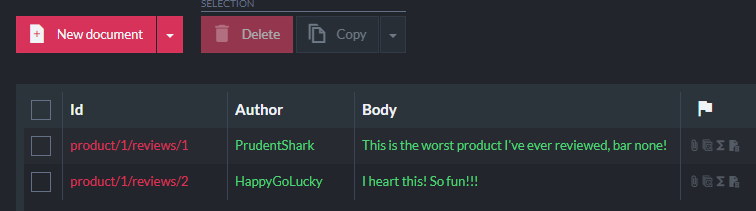
I’ll start by creating two documents representing simple user reviews with positive and negative sentiments:
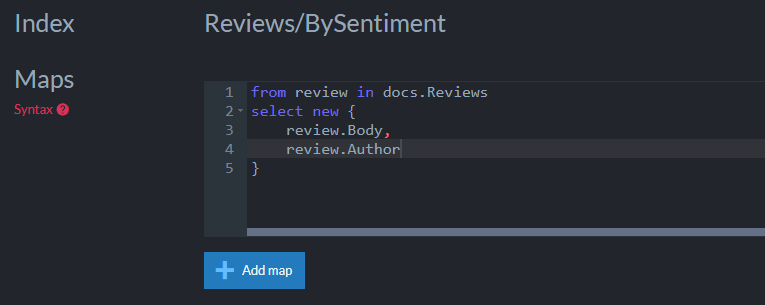
In an index named Reviews/BySentiment, I’ll select the Author and Body fields from the document:
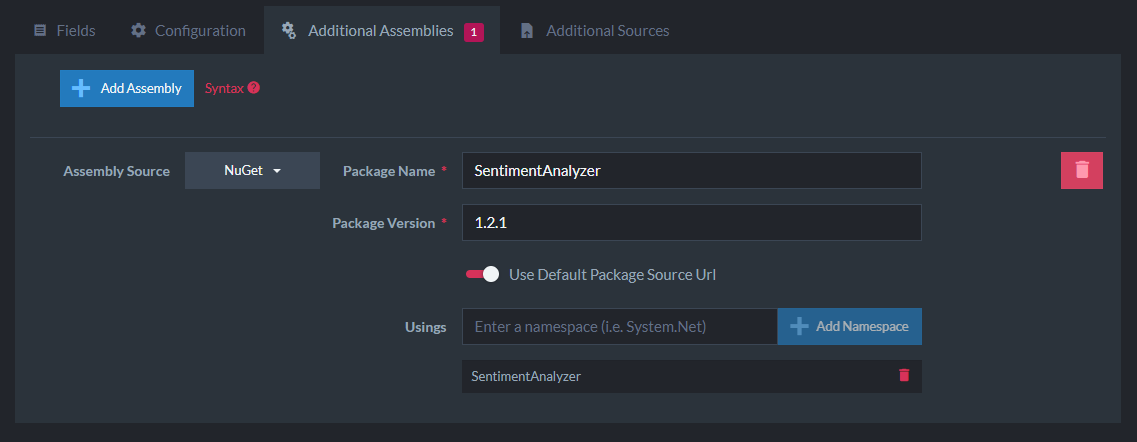
Now I’ll add a NuGet package with the Additional Sources feature to bring in the package and import the SentimentAnalyzer namespace:
I’ll call Sentiments.Predict and pass the review text which returns a Prediction boolean where true is “positive” and false is “negative” sentiment. I’ll select that value out into the Sentiment field:
  from review in docs.Reviews
  select new {
    review.Body,
    review.Author,
    Sentiment = Sentiments.Predict(
  	  review.Body).Prediction ? "Positive" : "Negative"
  }
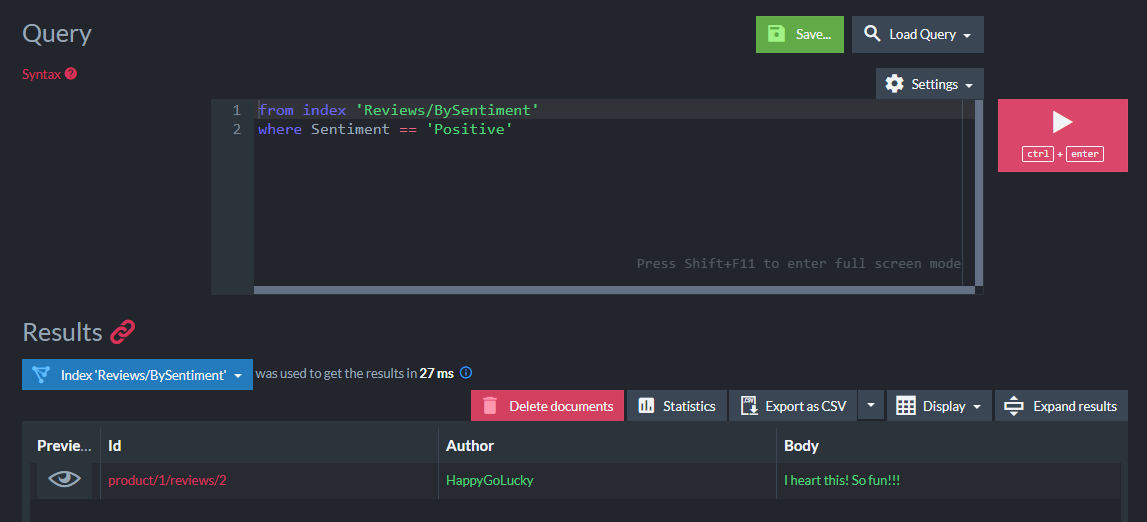
What this enables me to do is query for “positive” or “negative” sounding reviews:
  from index 'Reviews/BySentiment'
  where Sentiment == 'Positive'
The query returns the expected positive-sounding review:
That’s it! In a real-world application, we would likely create our own training model to use on our dataset that makes the most sense for our domain (movies, products, books, etc.).
NuGet Packages from Custom Sources
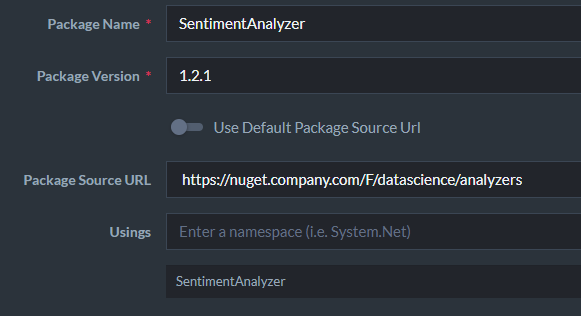
I’ve shown how you can pull in third-party NuGet packages but you aren’t limited to the official Microsoft package source. You can use any package source when adding a NuGet package such as your company’s MyGet feed:
How Does Running Additional Code Affect Performance?
I am sure you may be curious to know what performance implication this has on the indexing process (remember, it doesn’t impact the query performance).
This is additional code that is running so it will certainly incur overhead during the indexing process. For this article, I used the Free tier on RavenDB Cloud which is 2 vCPUs and 512MB of RAM. This is TINY when you think about what a production database server might require but I want to show you how fast RavenDB can be given these hardware constraints.
I’ll use this sample IMDB dataset that has 50,000 movie reviews and create the same kind of sentiment analysis index to compare the indexing performance on a larger sample size.
The first version will not be using any NuGet packages which will be our baseline. The Map operation just returns the text from each review:
  from review in docs
  select new {
    review.Text
  }
In RavenDB, you can view indexing performance for every index in a lot of detail. Indexing happens in batches. Think of putting a bunch of documents into a bucket and sending each bucket of documents down the “indexing assembly line.” There’s the time to process each bucket and then the total time to process all the buckets.
In this case, we have 49 batches of 1024 documents each and the total time to rebuild the index is about 2.75s (about 11-12k docs/s):
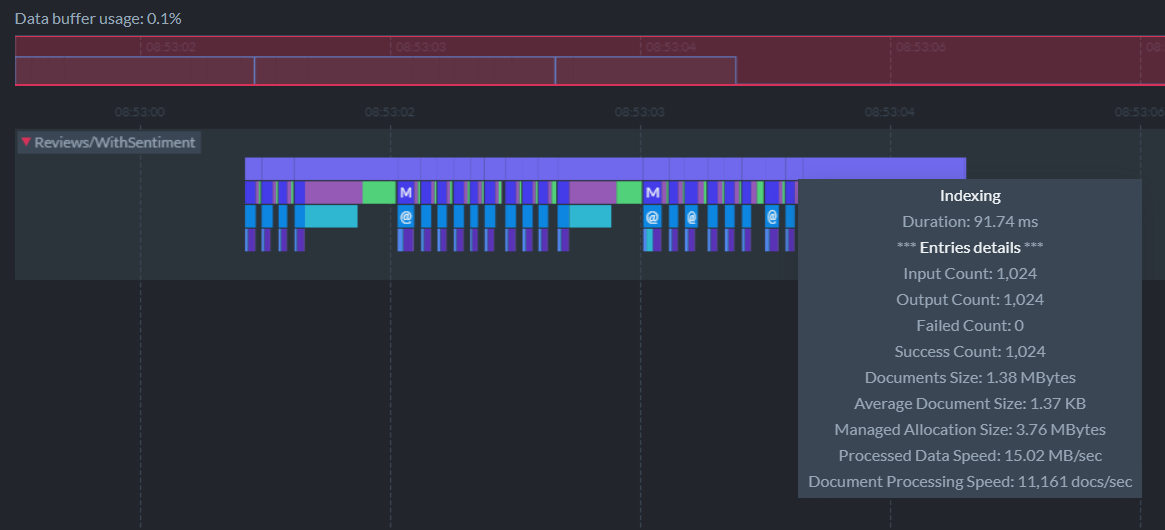
Each batch takes about 80ms but you’ll notice in the screenshot that when RavenDB commits to disk (the purple + green bars), sometimes it can take longer, about 500ms for those operations. This index is executed on a very low end machine, so RavenDB needs to process the data in small batches to avoid using too much memory. On bigger machines, RavenDB will be able to use much larger batches and index the documents more efficiently.
Now I’ll use SentimentAnalyzer to calculate the sentiment of each movie review alongside the text:
  from review in docs
  select new {
    review.Text,
    Sentiment = Sentiments.Predict(
      review.Text).Prediction ? "Positive" : "Negative"
  }
This time, it takes a total of 16 seconds to build the index or about 5 times as long. Each batch varies between 500ms to 1s depending on whether it needed to commit to disk:
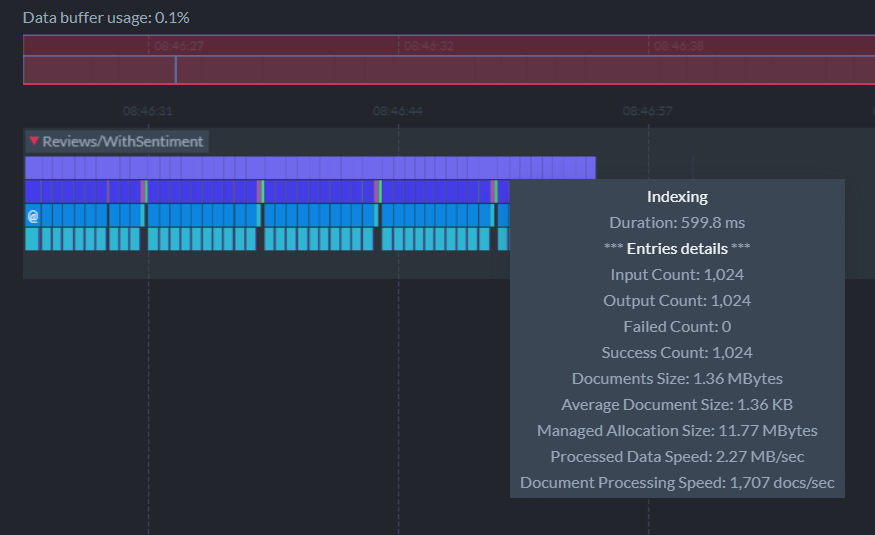
5X longer sounds a lot worse than it is. Executing any additional code in an index, especially ML.NET analysis, will incur overhead. But this isn’t necessarily “bad.” RavenDB will still respond instantly to queries, but the results will be stale until the index is rebuilt. Incremental builds of the index will be much faster.
For example, if I clone a review document to cause the index to update, the LINQ step takes ~1ms for a single document:
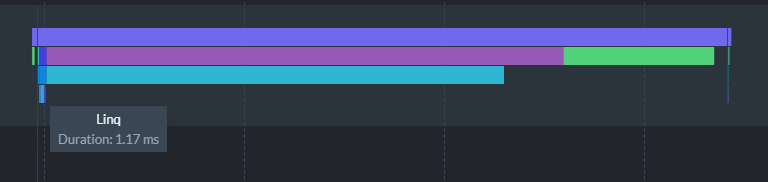
The entire rebuild took 700ms to run where the bulk of the time was spent writing and merging to disk. This is important to understand because having a lot of CPU power is great (for the analysis speed) but it’s just as important to use fast storage for your RavenDB database when you are looking for the best performance. The Free tier I’m using for this demo is probably using a low-end HDD from AWS EC2.
When it comes to indexing overhead, there’s a trade-off between performance and ease of querying. The major advantage we get is that we run the analysis computation on the database server instead of within our application, letting us trade that longer index build time for faster queries on the client-side.
Conclusion
Play with these new features yourself within the Live Test Playground or follow the step-by-step tutorials to get started with RavenDB.
NuGet package support and attachment indexing enable new use cases that other databases aren’t able to match. Learn about other powerful features released in RavenDB 5.1 like Replication and Document Compression.
Woah, already finished? 🤯
If you found the article interesting, don’t miss a chance to try our database solution – totally for free!