
Production post-mortem: How a Windows Kernel Lock Stalled the .NET GC
In the world of high-performance databases, “slow” is bad, but “stopped” is unacceptable. This was exactly what happened in one of our support cases. It started as a mysterious performance hiccup and ended with a deep dive into the Windows Kernel architecture, requiring the combined expertise of our team, the customer, and Microsoft Support.
This isn’t a tutorial on how to use debugging tools. It’s a story about how deep the software stack really goes and why sometimes, the solution to a database problem lies in the Operating System itself.
The Silent Outage
The issue appeared in a high-scale RavenDB cluster hosted on Azure. These were powerful machines running Windows Server 2019 and equipped with 256GB of RAM.
The symptom was terrifyingly simple: sporadic, severe database service freezes. The process wouldn’t crash; it would instead stop responding. These pauses lasted anywhere from twenty seconds to significantly longer. This is plenty of time to force cluster elections or drop client connections.
There were no error logs. No CPU spikes. The process would go silent, and then, moments later, pick up exactly where it left off.
Phase 1: The “Stop-the-World” Mystery
Our first line of defense is always observability. We analyzed the Event Tracing for Windows (ETW) data using PerfView.
Think of ETW as a built-in flight recorder for Windows, capturing system events with minimal overhead. PerfView is the tool we use to analyze that recording, giving us deep visibility into .NET runtime behaviors like Garbage Collection.
The traces painted a clear picture: the application was hitting massive “Stop-the-World” Garbage Collection (GC) pauses that matched the freeze duration exactly.
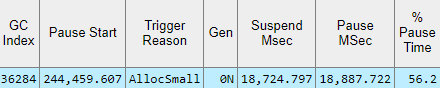
But there was an anomaly. The GC wasn’t taking a long time to collect memory. It was taking a long time to start, as shown in the Suspend Msec column.
In .NET, the Garbage Collector needs to suspend the Execution Engine (SuspendEE) to ensure a stable view of memory. It must prevent running threads from modifying object references while it analyzes and compacts the heap. To do this, it waits for every managed thread to reach a “Safe Point”. Our analysis showed the GC was waiting on one specific thread.
That thread wasn’t doing heavy calculation. It was stuck in a Hard Page Fault inside Voron (RavenDB’s storage engine), trying to read from a Memory Mapped File. A Hard Fault means the data isn’t in memory and must be retrieved from the disk. This is a slow, blocking operation compared to a ‘Soft’ fault, where the data is already sitting in RAM. The entire application was effectively being held hostage by a single disk read.

Phase 2: Seeking Expertise from the .NET Team
We had to ask ourselves: Is it normal for a single page fault to halt the entire runtime?
Since the PerfView traces identified the Garbage Collector as the bottleneck, we decided to reach out directly to the Microsoft .NET team for their insight. We opened a dialogue (see GitHub issue #111201) to share our traces and verify our interpretation of the data.

The .NET team analyzed the situation and confirmed that the issue was caused by how the thread state is managed during these specific operations. When a thread is executing managed code, the GC cannot force it to stop immediately. Instead, it must wait for the thread to reach a safe point in the code where it can voluntarily pause.
When we access memory-mapped regions directly from managed code, the thread remains in Cooperative Mode. This is different from a standard system call (P/Invoke), which would switch the thread to Preemptive Mode and allow the GC to proceed safely while the operation completes.
Because the access happens directly in managed code, if a Hard Page Fault occurs, the OS suspends the thread to fetch the data from disk, but the .NET runtime still sees that thread as “active” in managed code. As a result, the Garbage Collector cannot suspend the execution engine and is forced to wait until the page fault resolves. It turns a local OS-level delay into a global application freeze.
This was the pivotal point. We confirmed the issue wasn’t in RavenDB’s code, nor was it a bug in the .NET Runtime. The bottleneck was inside the Operating System.
Phase 3: The Kernel Deep Dive
We couldn’t fix the OS, so we advised the customer to open a support case with Microsoft. This kicked off a “Support Triangle” collaboration:
- The RavenDB team provided the architectural context (specifically how our Working Set grows over time due to Memory Mapped Files).
- The Customer actively monitored the system to catch the issue in action, providing the traces and logs requested by the engineering teams.
- Microsoft brought a Senior Escalation Engineer with kernel debugging tools.
The investigation shifted from user-mode tools (PerfView) to kernel-mode tools (xperf and procdump, procmon). The traces revealed contention between OS maintenance and application activity, amplified by the sheer size of the memory being managed.
- The Setup: The RavenDB process had accumulated a massive Working Set (resident memory) because the 256GB nodes had plenty of available RAM, delaying the OS’s need to trim pages aggressively.
- The Trigger: Eventually, the OS Memory Manager initiated a trim operation (MmTrimSection). It was triggered either by a background flush (FlushFileBuffers) or the OS itself deciding that the working set was too big.
- The Bottleneck: The trace analysis showed that the OS was spending over 60 seconds simply “walking” (scanning) the memory pages of the process to decide what to trim. Because the Working Set was so large, this maintenance operation became prohibitively slow.
- The Lock: To perform this scan safely, the OS held an exclusive lock on the Erasource kernel resource.
- The Victim: Simultaneously, a managed thread hit a Hard Page Fault (trying to read a page from disk). To resolve the fault, it needed that same Erasource lock.
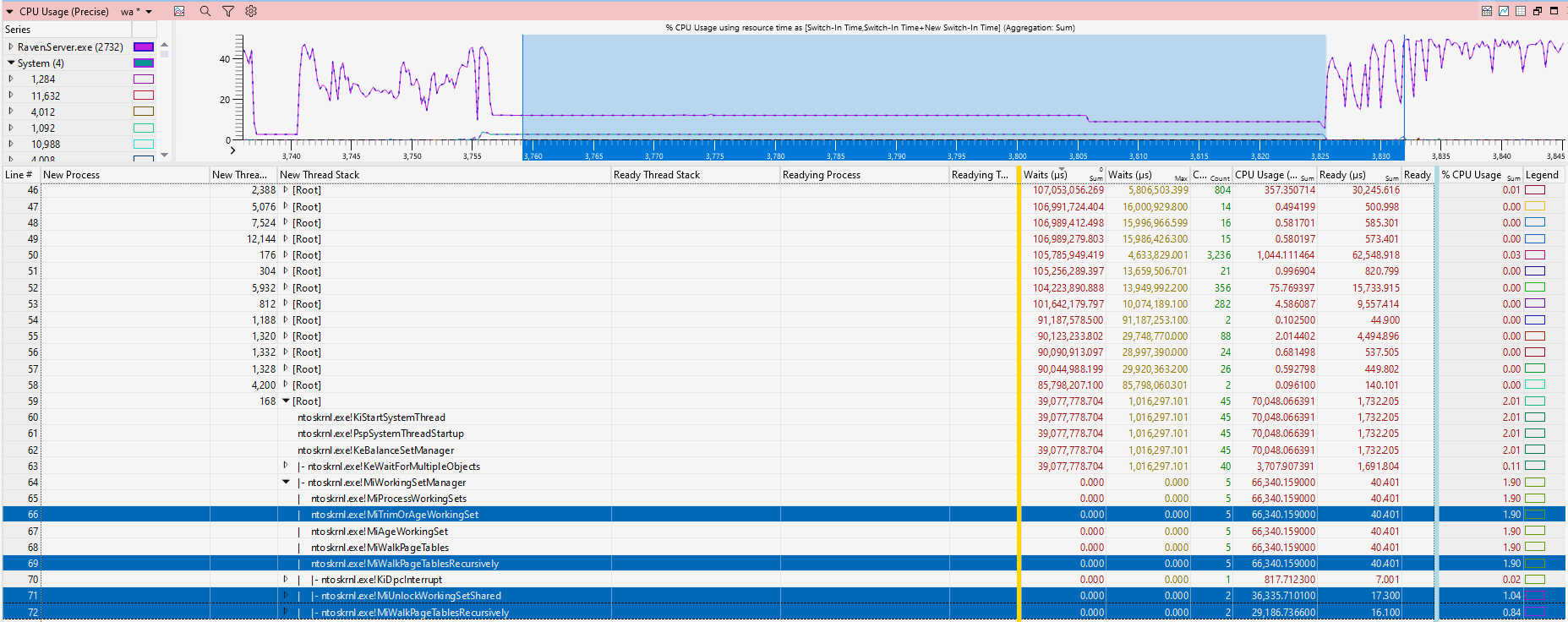
Because MmTrimSection held the lock for an extended period under high load, the reader thread was queued behind it. The GC, waiting for the reader thread, paused the entire service.
The Solution: Architecture over Configuration
The diagnosis was clear: this was a scalability limitation in the Windows Server 2019 Memory Manager when dealing with large memory sections.
Microsoft’s recommendation was definitive: Upgrade to Windows Server 2025.
They explained that Server 2025 includes a re-architected Memory Manager which handles this type of maintenance operation more efficiently. The customer performed the upgrade, and the results were astonishing. The “Not Responding” events vanished, and the cluster returned to full stability.
The “Full Stack” Reality
This case serves as a reminder that in modern computing, the boundary between “Application” and “OS” is thinner than we think. What seems to be a pause caused by a bug in your service, might be caused by something on the kernel level.
Interestingly, this isn’t the first time we’ve hit the architectural ceiling of Windows Server with this specific customer. Years ago, we helped them diagnose a massive page fault issue that was only resolved by moving from Windows Server 2016 to 2019 (you can read that postmortem here).
History, it seems, has a way of repeating itself. As hardware grows larger and workloads get heavier, the Operating System must evolve to keep up.
Many support teams might stop at “It’s an OS issue, good luck.” At RavenDB, we don’t work that way. No matter if it’s RavenDB codebase, .NET runtime or kernel, we trace the problem till we get it solved.
If you are running high-performance workloads and need a database backed by engineers who aren’t afraid of the kernel, check out RavenDB. Grab a free developer license at ravendb.net.
Woah, already finished? 🤯
If you found the article interesting, don’t miss a chance to try our database solution – totally for free!