Master RavenDB: Indexing Staleness
Highlights
- RavenDB indexes update asynchronously to maintain high write performance and availability.
- Query results may be temporarily stale while indexes process new data in the background.
- Developers can control query freshness using WaitForNonStaleResults or session-level settings.
To Wait or Not to Wait: Practical Examples of Staleness
Imagine inserting thousands or millions of documents into your database. If you had to choose to slow down the writes because of indexing data as they come in or delegate the indexing process to a background non-blocking operation, what would you choose?
Some databases enforce strict consistency, ensuring that every query reflects the most recent committed state. Others, however, prioritize speed and availability over immediate query consistency while maintaining stored data consistency.
RavenDB is a hybrid between the strict data consistency of ACID and the availability of the BASE paradigms. This distinction ensures your data is safely stored, while indexes prioritize speed and availability. This might result in indexing staleness, which will be the main topic of this article. Let’s explore staleness in RavenDB and how you can control it.
Soft state
While our Voron storage system is fully ACID compliant, our indexes follow the BASE paradigm. BASE trades strong consistency for high availability. If you want to learn more about BASE (Basically Available, Soft state, Eventual consistency) you can read about it here.
It means that, after introducing new data, the indexes will be in a soft state. It comes from the BASE paradigm, and it’s called soft because the state of the database changes while they process recent changes.
In RavenDB, when you input new data, it is stored immediately. Indexes, on the other hand, update it asynchronously; the indexing has no detrimental effect on data ingress. In other words, they work in the background batch by batch while queries will still respond.
The freshness of query results changes over time as RavenDB index is processing new entries. When the index completes its indexing work, the query results become up to date with recent changes in the data.
The speed of achieving up-to-date results strictly depends on indexing performance, but in the majority of real systems, data accessibility is much more important than up-to-date results. At the same time, long periods of staleness are highly unlikely, so it might not be a problem at all.
NOTE: Not every read from the database is impacted by staleness. Staleness might impact only operations that work with indexes – queries.
Operation | Potential staleness | Example |
|---|---|---|
Query | ✅ | employees = session.Query<Employees>() .Where(x => x.Name == “Laura”) .ToList(); |
Load from ID | ❌ | Reports reports = session.Load<Reports>(“reports/2025-03-02”); |
Get all from the collection | ❌ | List<Reports> reports = session.Query<Reports>().ToList(); |
Load ID that starts with | ❌ | List<Reports> reports = session.Query<Reports>().Where(x => x.Id.StartsWith(“reports/2025-03/”).ToList(); |
There is an interesting case of filtering, as it will never be stale. It doesn’t return stale results for a simple reason: it doesn’t use the same search engine. It uses a JavaScript search engine that is less optimized. In effect, it is free from staleness, but using it without understanding might cause performance issues. You can read about it more here.
.Filter(f => f.Address.Country == "USA", limit: 500)To wait or not to wait
Let’s take a look at practical examples that will show when the staleness is fine and in some cases where it’s not:
Good enough
In the majority of the cases, handling a request requires no follow-up consistent query. This means that working with the default settings is by-design safe and correct. For example, an e-commerce product catalogue search doesn’t need to be 100% accurate immediately. A slight data lag doesn’t ruin application experience. The product can take some time to appear on the catalogue page; users will not notice anyway. The same rules apply to most of the applications. Being able to handle requests faster is always an advantage. Even if there’s a slight possibility of having a stale query result..
Depending on the size of the changes, this propagation might take a couple of milliseconds to a few seconds when adding many new documents to the database. For new indexes, it can take more than a few minutes to be fully processed. The processing time changes depending on several factors like the system resources utilization, or if your indexes are poorly optimized (learn here how to prevent it).
Rare case
Being honest there are very few examples of real life scenarios where you can’t rely on stale query results.. For example, testing software. When you write unit or end to end tests, sometimes a slight delay may result in a false negative test success result. On the other hand, we could name a few extreme cases, e.g. you can’t allow yourself to make high frequency trading using old data. The speed required for this can be counted in milliseconds, if not less, and errors can cost money.
But how to check if your results are stale?
Stale or not
To check if your results are stale, you can use the statistics method. It gives you access to useful variables like isStale or indexUsed that can give you the information you desire. Basic query without those variables looks like this:
  employees = session.Query<Employees>()
                  .Where(x => x.Name == "Laura")
                  .ToList();
We add two variables and change it to:
  employees = session.Query<Employees>()
                  .Statistics(out QueryStatistics stats)
                  .Where(x => x.Name == "Laura")
                  .ToList();
  bool isStale = stats.IsStale; // Is it stale?
  string indexUsed = stats.IndexName; // which index was used
Which would return us:
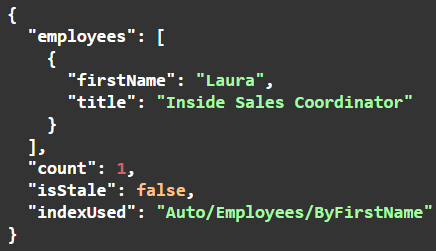
This way, you can see if your results are stale and use that information to your advantage. As you can see, first you get the query and then you get your stats. The property isStale tells if your index is stale, and indexUsed shows which index is used.
Keeping it fresh
Removing staleness is a performance-accuracy trade-off, but this may not be a problem, e.g., in unit tests, where you need fresh data to prevent flaky fails. Staleness can be stopped in three ways; let’s explore all three.
Single Query
Need a single query that always avoids staleness? Use the Customize function to wait for up-to-date results.
  List<Product> results = session.Query<Product>()
    .Customize(x => x.WaitForNonStaleResults(TimeSpan.FromSeconds(5)))
    .Where(x => x.PricePerUnit > 10)
    .ToList();
This will give you results that are fresh just for this query. Useful if you don’t need precision all the time. By default, it will timeout after 15 seconds with exception; you can customize it using the timeout parameter.
Single Session
To keep data up to date in a single session, you can use WaitForIndexesAfterSaveChanges method in our client SDK. This way, you will always wait for indexes, after calling saveChanges.
  session.Advanced.WaitForIndexesAfterSaveChanges(
    timeout: TimeSpan.FromSeconds(5),
    throwOnTimeout: false,
    indexes: new[] { "Products/ByName" });
Timeout specifies how long the operation will wait before timing out. If set to null, it will wait for up to 15 seconds.
ThrowOnTimeout determines whether an exception should be thrown when the timeout period is reached. If set to false, the operation will not throw an exception even if it times out.
Indexes let you pick for which exact indexes your client app will be waiting for. If set to null, the operation will wait for all indexes affected by the session’s changes to update.
Document store
If really needed, you can set up a whole document store to wait for up-to-date indexes. You can add it as a convention to your document store so all sessions will wait for reindexing:
store.OnBeforeQuery += (sender, beforeQueryExecutedArgs) =>
  {
    beforeQueryExecutedArgs.QueryCustomization.WaitForNonStaleResults();
  };
As you can see RavenDB allows you to customize it on many levels.
Summary
At the end of the day, index staleness is a natural consequence of speed and availability. In the majority of applications this consequence has no real impact on the design of an application. If you are more interested in indexes and how to handle them well, check our article here, and don’t be stale on your RavenDB knowledge.
Interested in RavenDB? Grab the developer license dedicated to testing under this link here or get a free cloud database here. Any more questions or just want to hang out and talk with the RavenDB team? Join our Discord Community Server – invitation link is here.
Frequently Asked Questions
What types of indexes does RavenDB offer to give me control over query performance?
RavenDB offers Static indexes, which give developers complete control over precomputing data and optimizing query performance.
Do I have to manually create all my indexes to maintain performance?
No, RavenDB features Auto indexes, which allow it to act as a self-optimizing database that handles index creation and optimization with zero manual effort.
How do I write queries against my indexed data?
You can query your data using the Raven Query Language (RQL), which empowers you to write simple yet powerful SQL-style queries.
Woah, already finished? 🤯
If you found the article interesting, don’t miss a chance to try our database solution – totally for free!