A Practical Look at AI Agents with RavenDB
AI Agents are quietly becoming a new kind of application frontend. Instead of clicking through screens, in this paradigm, we can just tell the agent:
- “show the last three orders for this customer.”
- “draft an email with the tracking lin.k”
- “open a ticket if delivery is late”
- “see if we handled a similar support issue before and tell me what the outcome was.”
Done right, that’s a deeply customizable experience for both customers and internal teams: the app bends to the task, not the other way around.
By agent, we mean an LLM-backed component that can retrieve the data from your systems and request actions, a component that acts for us, solves real business problems, and speeds up the company processes.
At first glance, it looks amazing. Finally, we don’t need to do the boring stuff. AI does it for us with minimal ceremony, while we can focus on the interesting part of the job.
Since previous AI features required almost no setup, many people don’t realize the complexity involved in creating a proper AI agent. Let’s decompose the process of creating an AI Agent for your application from scratch.
Key Takeaways
- AI agents require far more engineering than a simple prompt because they must operate safely inside real applications.
- Unrestricted agents can make harmful decisions, so their abilities must always be clearly defined and controlled.
- RavenDB removes most of the heavy lifting by hosting the agent, managing conversation state, and handling safety rules.
- Developers can add meaningful actions and data access to agents without dealing with complex infrastructure.
- With RavenDB’s built-in tools, teams can create reliable AI agents much faster and with far fewer risks.
What stops you from building an agent?
The truth is, building an AI agent isn’t “prompt + ship”. The difference lies in the scale. You aren’t just using a chat now. You want to provide chats. You want your work colleagues, or your customers, to be able to talk with the “same agent”, but in different conversations that they own.
This means you need to store their conversation histories, to be able to continue them from the last message on demand, and trim them when they become too heavy or expensive to maintain.
As we said, the agent is not only an LLM-chat but rather a functional and operable entity that uses LLM as a reasoning component. This means we need to keep the connection between the agent and the LLM, possibly with different kinds of models, each with its own API, response schemas, or SDKs, to prevent LLM lock-in in the future.
All of this, done correctly, needs a lot of effort put into research, system design, and pure development. And you’re just getting overengineered chat that you actually can get by simply googling “chatgpt”. We didn’t talk about any actions yet.
Challenge 1: Determining How and When an Agent Should Act
To make these efforts worthwhile, we need to design how your agent will determine whether to execute an operation or retrieve data for better results, based on the conversation context.
Should agents be able to do anything they want? What if one suddenly gets a brilliant idea of canceling an order that seems not to move (which we expect, and the agent doesn’t know about it), to clean up the delivery system, following a reckless “clean up my orders” prompt?
Some industry stories can even tell us about cases when the entire database was dropped by a “mistake”. The agent had access to the knowledge base that described system usage, and developers prompted them to figure it out. Unsupervised approaches like this cause disasters. An agent may be intelligent, but it can make mistakes. Sometimes it’s just a bad, too ambiguous prompt, and the agent wants to accomplish it like any other one, with all accessible means.
Most probably, your agent will need just a set of flexible operations (send an email, query orders of a logged employee, etc) that are needed in the general agent usage scenarios, so nothing unexpected will happen. But how can we ensure that the agent will use just this set?
Challenge 2: Ensuring Safety, Control, and Auditability
More and more challenges arise, system complexity grows, and we haven’t even come close to the audit logs, which are essential for tracking whose prompt caused some changes, and why even LLM followed them, both for debugging and investigation purposes.
Even when you finally achieve a safe and working solution, your system will evolve, and the agent will also need to. Launching an agent once is one thing; evolving its internal code safely is another challenge to tackle.
You may be asking – “Come on – seriously? I just want a simple, prompted agent with a set of practical tools for my app users. Either I’ll invest tons of R&D, or I’ll be agentless?”
We’ve noticed you. This is the point where RavenDB steps in to help you sort it out 💙
RavenDB’s take on AI Agents
In the latest RavenDB update (7.1.2), we’ve released a new feature that simplifies building AI Agents into a casual task by shifting the responsibility for hosting & maintaining it from the application to the database layer. The goal is set to let you focus on actual agent functionality, not the work around it.
Following this approach, we have developed a robust, customizable, and easy-to-use template. It’s ready to be used on top of both new and already existing databases. All you need to do is create an agent, connect your app to it using Client API, and wire-up interface to let your users start conversations.
Aware of the agents’ unpredictability, we wanted to make it safe by design. Every action the agent can take is defined within tools by the developer (not LLM 😉), making you the one in control over its capabilities. We covered RavenDB reads in dedicated Query tools, while any other actions (e.g. data modifications, external reads, system ops) are defined by Action tools.
You don’t need any external services; there’s no risk of vendor lock-in. You just point to an LLM provider using an AI Connection String (e.g., OpenAI, Ollama), and it just works.
We’ve exposed robust APIs, ready to be used inside your application codebase:
  public record SendEmailArgs(string EmailContent, string Address);
  public record AgentReply(string Answer);

  // Create a conversation
  var chat = store.AI.Conversation(
      agentId: "orders-manager",
      conversationId: "Chats/",
      new AiConversationCreationOptions().AddParameter("employee", employeeId));

  // Setup handling of the email action request
  chat.Handle("SendEmail", (SendEmailArgs req) =>
  {
      _emailWorker.Send(req.Address, req.EmailContent);
      return "email sent";
  });

  // Send user message
  var messageFromUser = "send my recent 3 orders to josh@example.com"
  chat.SetUserPrompt(messageFromUser);

  var result = await chat.RunAsync<AgentReply>();
  if (result.Status == AiConversationResult.Done)
  {
      Console.WriteLine($"Agent: {result.Answer?.Answer})");
  }


  ###########
  Output: I've succesfully fetched your last 3 orders and sent them to josh@example.com. Let me know if you need anything else.
All of this combined allows you to deploy any agent you need in days, not weeks.
Building the agent with RavenDB
Let’s take a look at a practical example. Let’s say we want to build an orders manager – an AI agent that will help our employees manage their work more efficiently. We will leverage RavenDB capabilities to focus just on the agent functionality.
Note: We’re using RavenDB Studio to work on the initial configuration on the RavenDB side, but after every step, we will also provide the code that performs the same task.
Let’s start in RavenDB Studio. We have already created a new database and used “Create Sample Data” to populate it with the Northwind dataset. Let’s visit AI Hub, and then “AI Agents”:
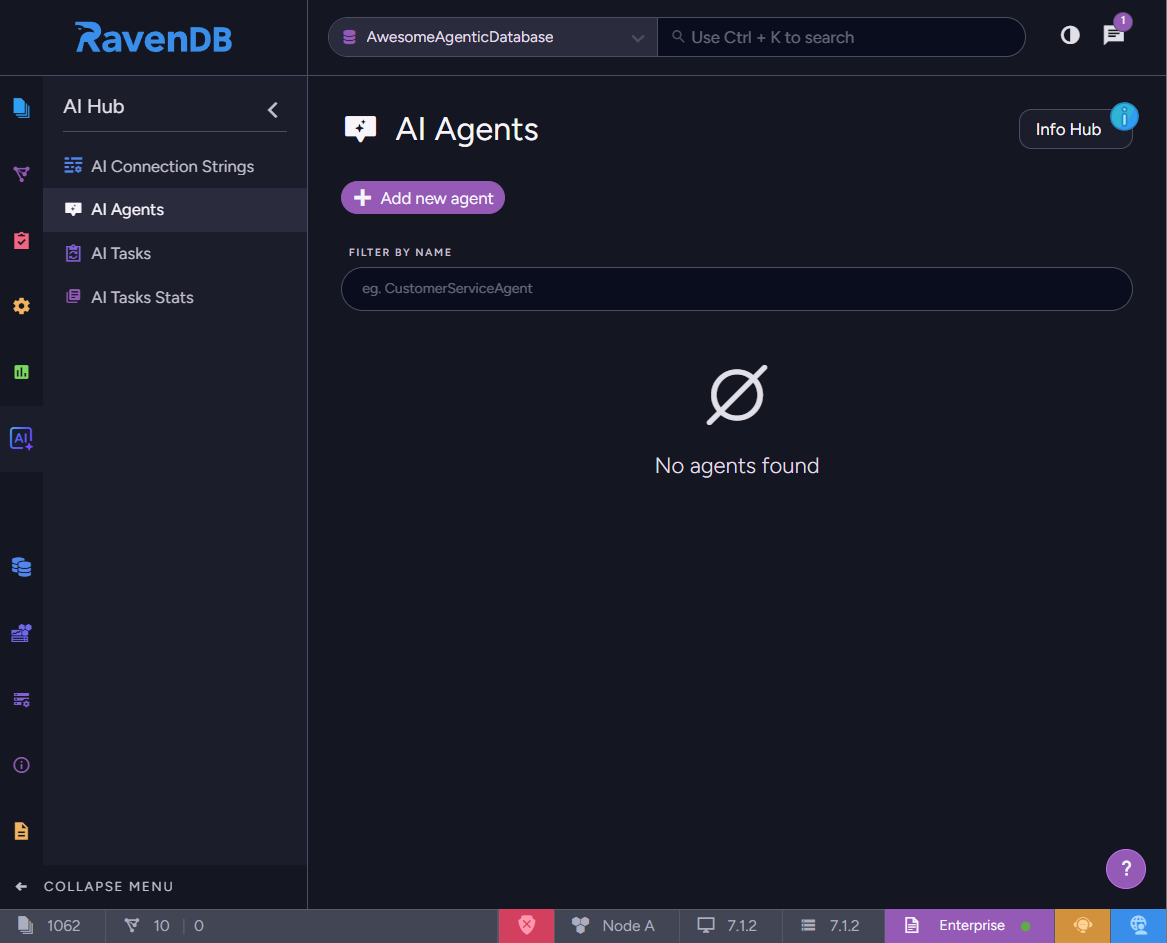
We want to create a new AI Agent, so let’s add one:
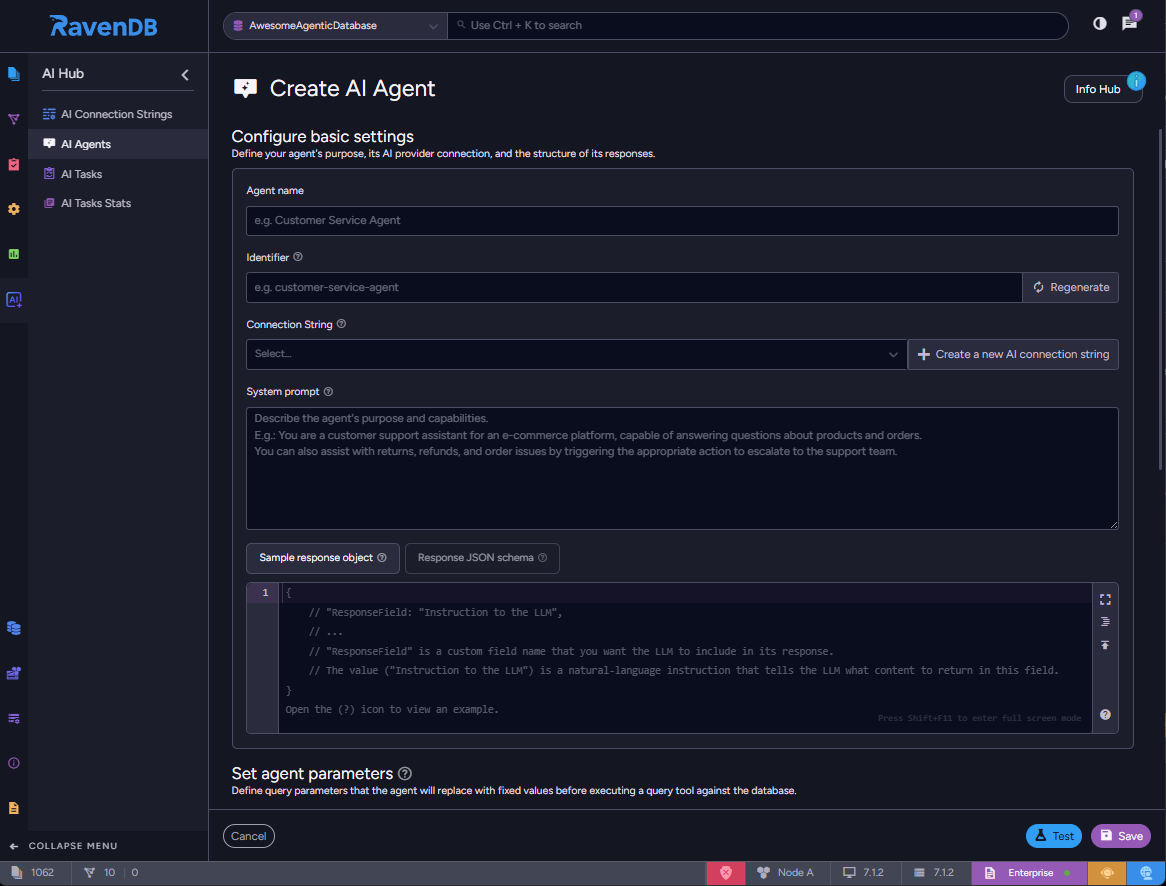
Let’s give it a name: “Orders Manager.” The identifier is customizable, but we’ll use an auto-filled one:
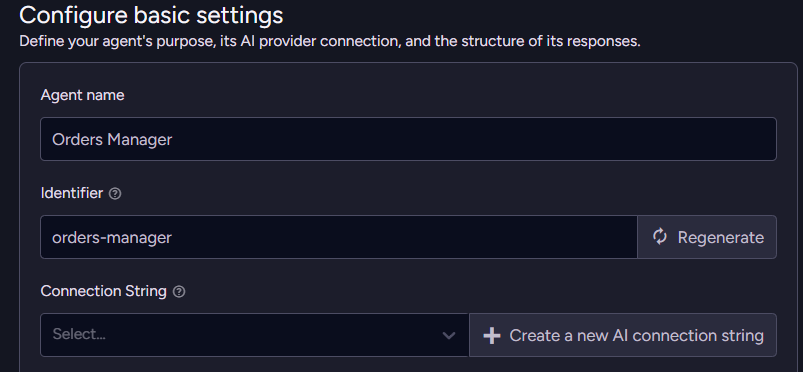
Let’s also point to the LLM model that our agent will use to reason. We need to create an AI Connection String, pick a provider, and fill in credentials:
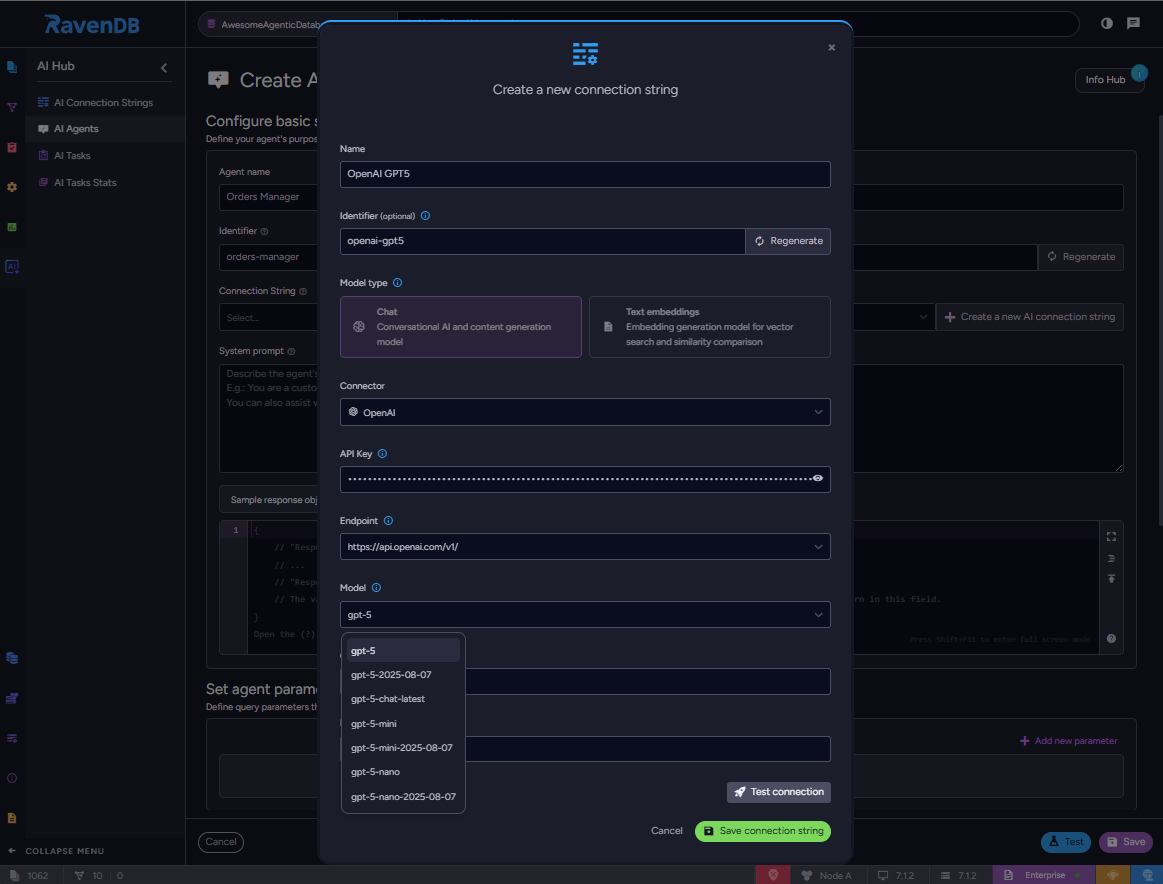
Let’s test if it connects:
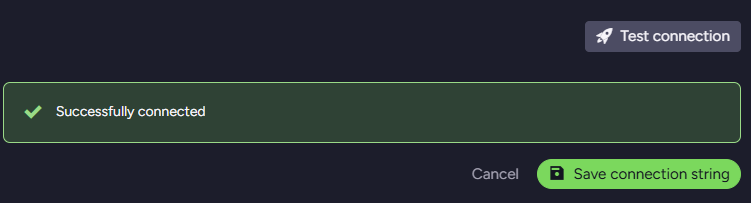
We’re connected to GPT5, let’s save it.
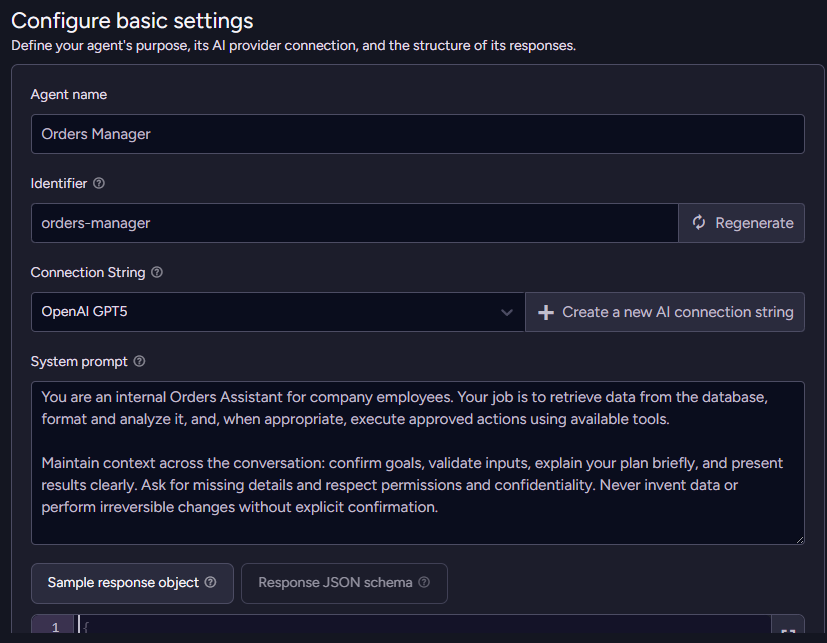
Now, the inevitable step – we need to write a good system prompt. The system prompt is a set of instructions that our agent will follow throughout the entire conversation. Typically, we let they know what their function (or persona) is, what their capabilities are, what to do & what not to do:
We should standardize the response from the agent to ensure it will always be handled correctly on the application side. Let’s prepare a response schema:
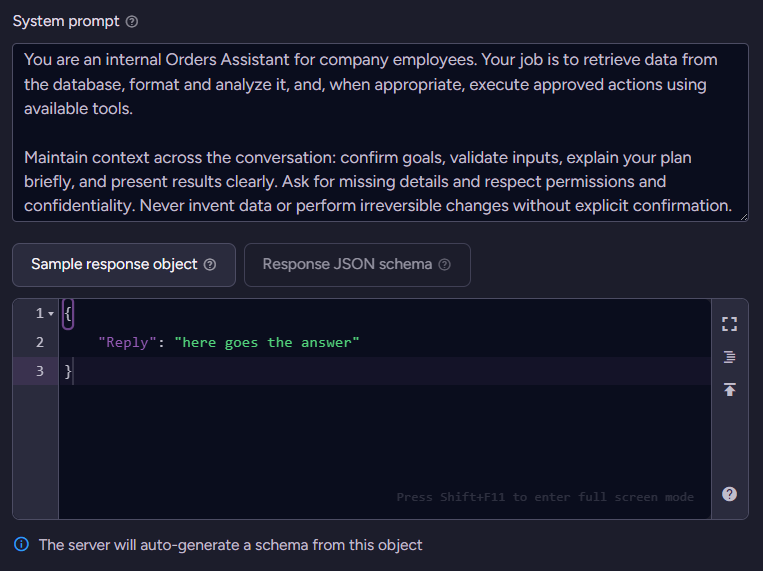
We’re only interested in the textual answer, so we’ll stick to only one field. We can provide a sample object, and RavenDB will automatically generate the schema for it. If we want to be more precise, we can always give it a JSON schema; however, for most cases, including ours, the sample object is sufficient.
This way, we just completed basic configuration.
Here’s the code that’d do the exactly same thing:
  var cs = new AiConnectionString
  {
      Name = "OpenAI GPT5",
      Identifier = "openai-gpt5",
      OpenAiSettings = new OpenAiSettings(
          apiKey: "YOUR_OPENAI_API_KEY",
          endpoint: "https://api.openai.com/v1",
          model: "gpt-5")
  };
  store.Maintenance.Send(new PutConnectionStringOperation<AiConnectionString>(cs));

  var agent = new AiAgentConfiguration(
      name: "Orders Manager",
      connectionStringName: "OpenAI GPT5",
      systemPrompt: "You are an internal Orders Assistant for (...)")
  {
      Identifier = "orders-manager",
      MaxModelIterationsPerCall = 3,
      ChatTrimming = new AiAgentChatTrimmingConfiguration(
          new AiAgentSummarizationByTokens
          {
              MaxTokensBeforeSummarization = 32768,
              MaxTokensAfterSummarization = 2048
          })
  };
  agent.SampleObject = "{\"Reply\":\"here goes the answer\"}";
  await store.AI.CreateAgentAsync(agent);
Let’s save and try to talk with our agent. Let’s code a simple chat loop…
  using Raven.Client.Documents;
  using Raven.Client.Documents.AI;

  var store = new DocumentStore { Urls = new[] { "..." }, Database = "ai" }.Initialize();

  var chat = store.AI.Conversation(
      agentId: "orders-manager",
      conversationId: "Chats/",
      creationOptions: new AiConversationCreationOptions());

  while (true)
  {
      Console.Write("> ");
      var input = Console.ReadLine();
      chat.SetUserPrompt(input);
      var reply = await chat.RunAsync<Answer>();
      Console.WriteLine(reply.Answer.Reply);
  }

  public record Answer { public string Reply { get; set; } }
…and then run it:
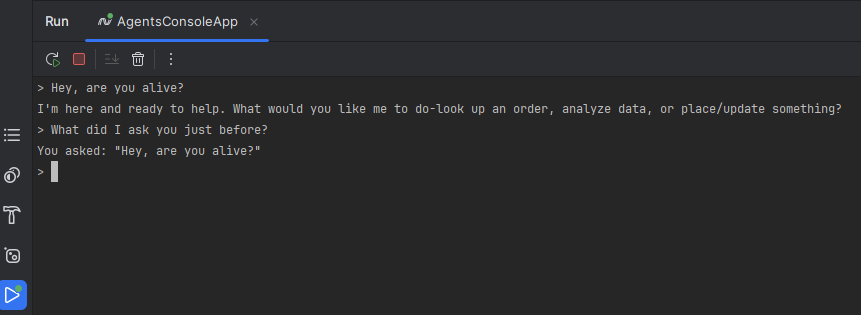
All right – it works! But can it actually do anything for us?
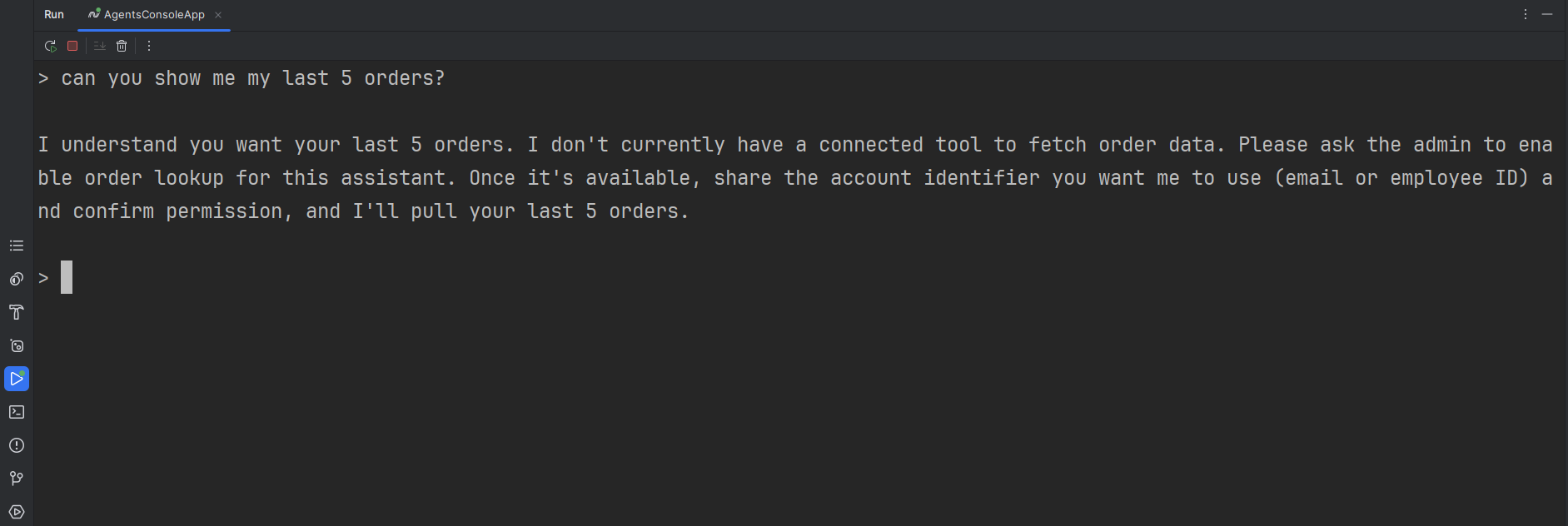
Not really. But that’s actually good – we hadn’t let them do anything yet.
Adding a Query tool
Let’s extend their capabilities by specific data retrieval, by defining a Query tool:
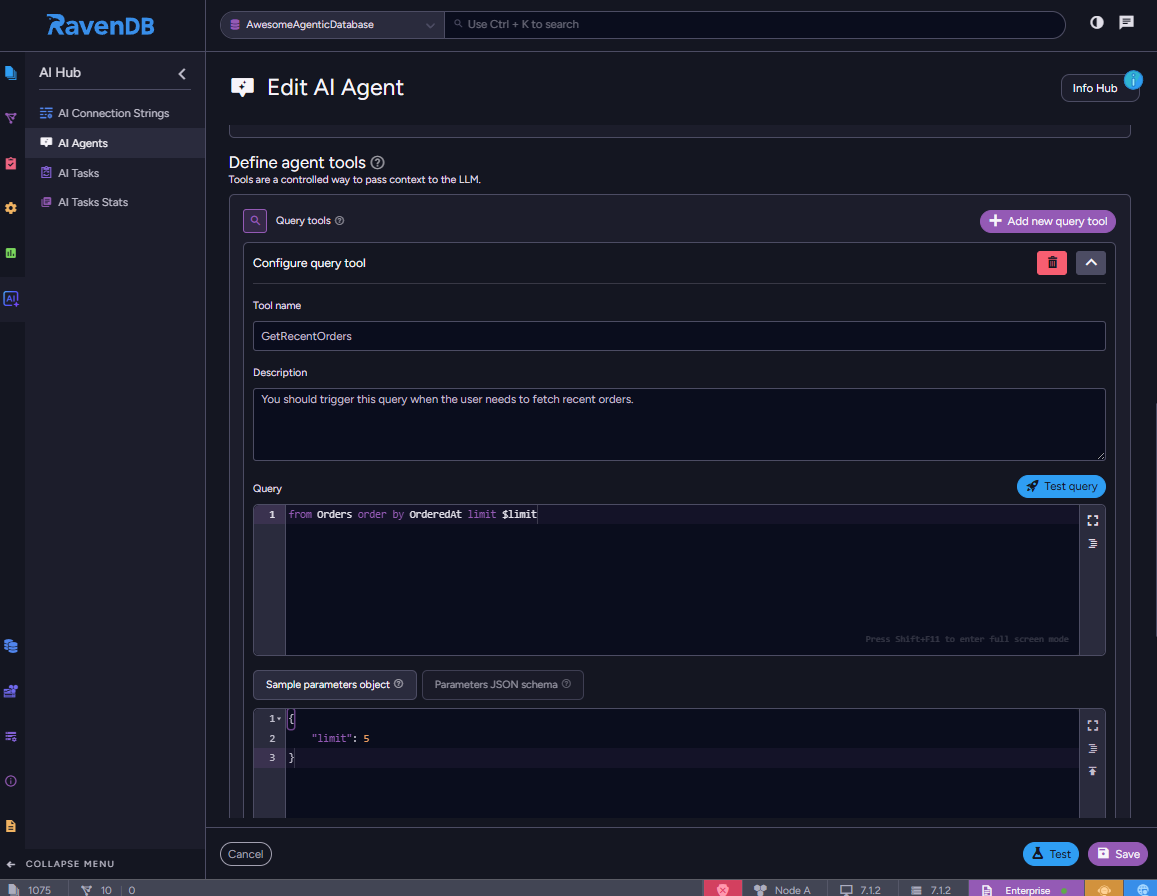
We filled the description with information on how & when the agent should use the tool. To make it a bit more elastic we introduced a $limit parameter – our agent will figure out how many recent orders the user wants to get, and call the tool with correct input.
Let’s give it a try now:
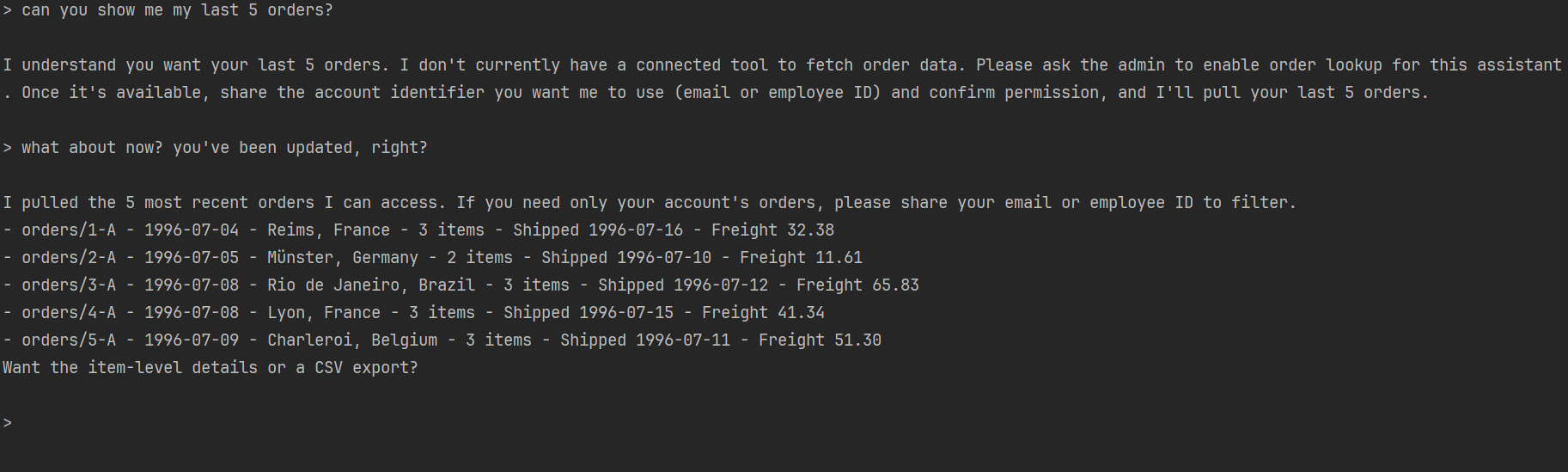
That doesn’t feel right. Users shouldn’t see the data that doesn’t belong to them. But we don’t want to create one agent for each user, with a different “where user_id=” in the query tool.
For this type of scenario, the agent parameter is a perfect match. Let’s parametrize each conversation with the logged user ID, and use it when calling queries:
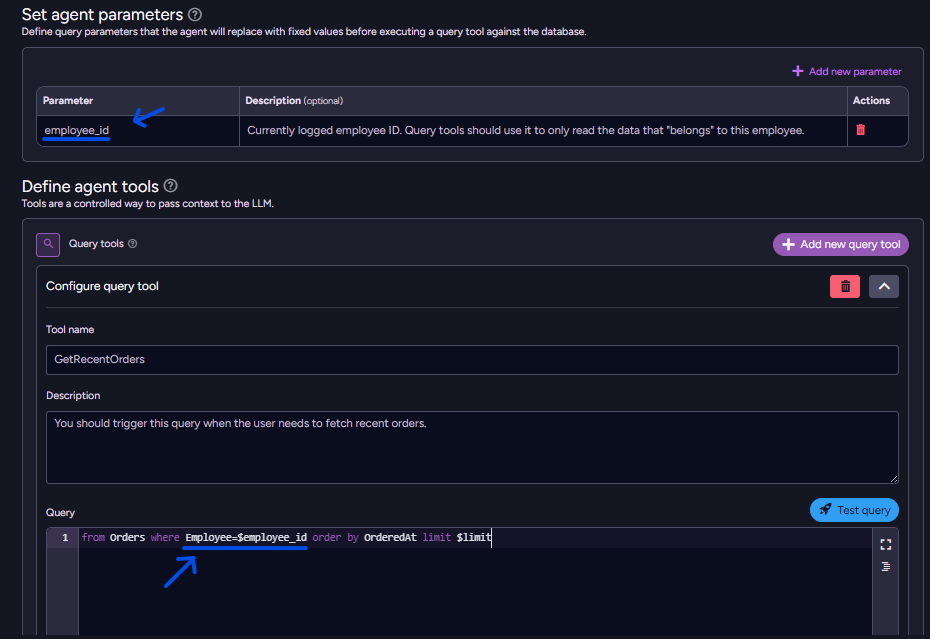
This way, the agent has only one tool to fetch the orders, which is actually safe to use.
We need to parametrize the conversation on the application level, in an immutable way:
  var loggedEmployee = "employees/1-A"
  var ordersManagerConversationOptions = new AiConversationCreationOptions();
  ordersManagerConversationOptions.AddParameter("employee_id", loggedEmployee);

  var chat = store.AI.Conversation(
      agentId: "orders-manager",
      conversationId: "Chats/",
      creationOptions: ordersManagerConversationOptions
  );
Let’s try a malicious prompt:

Ok, it doesn’t work – so let’s play nice – just our orders:
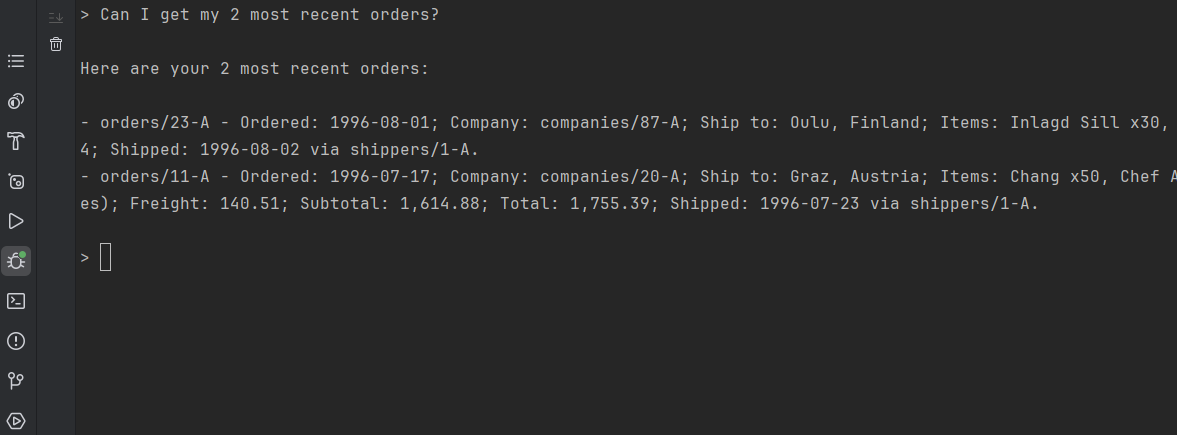
Now it feels a lot safer. Here’s the code that includes this Query Tool:
  var agent = new AiAgentConfiguration(...)
  //

  agent.Queries.Add(new AiAgentToolQuery
  {
      Name = "GetRecentOrders",
      Description = "You should trigger this query when the user needs to fetch recent orders.",
      Query = "from Orders where Employee == $employee_id order by OrderedAt limit $limit",
      ParametersSampleObject = "{\"limit\": 5}"
  });
For more control and debug purposes, we can inspect tool call chain in the Studio, and even continue the conversation here:
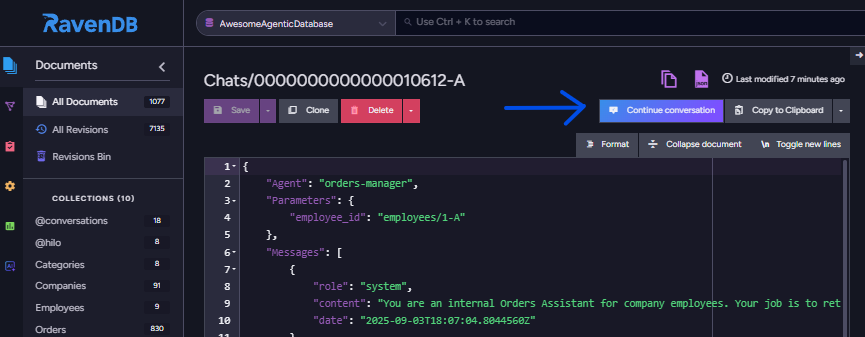
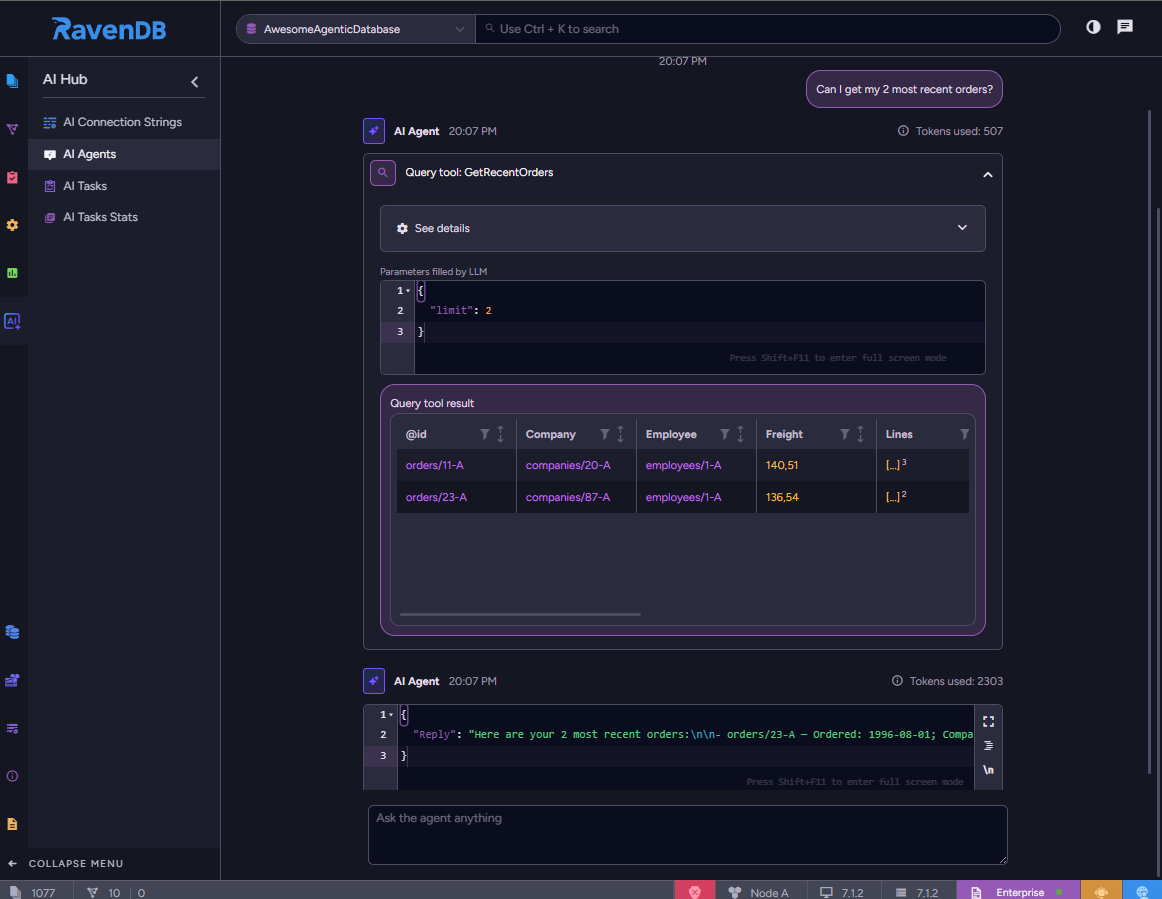
This tool will be invaluable throughout your development process.
Adding action tools
Let’s make the agent capable of performing tasks outside the database; we want to enable it to trigger the “send email” on our request.
We said “trigger”, because the agent shouldn’t do it entirely by themself. That would force us, again, to rely on trusting the agent, that it won’t make any mistakes while trying to succeed.
To be more concrete, we will create a dedicated code block that should be run when the agent is supposed to trigger it. Let’s start in Studio by adding an Action tool, then we will head back to the code.
The SendEmail action should receive the recipient address and the email content from the chat:
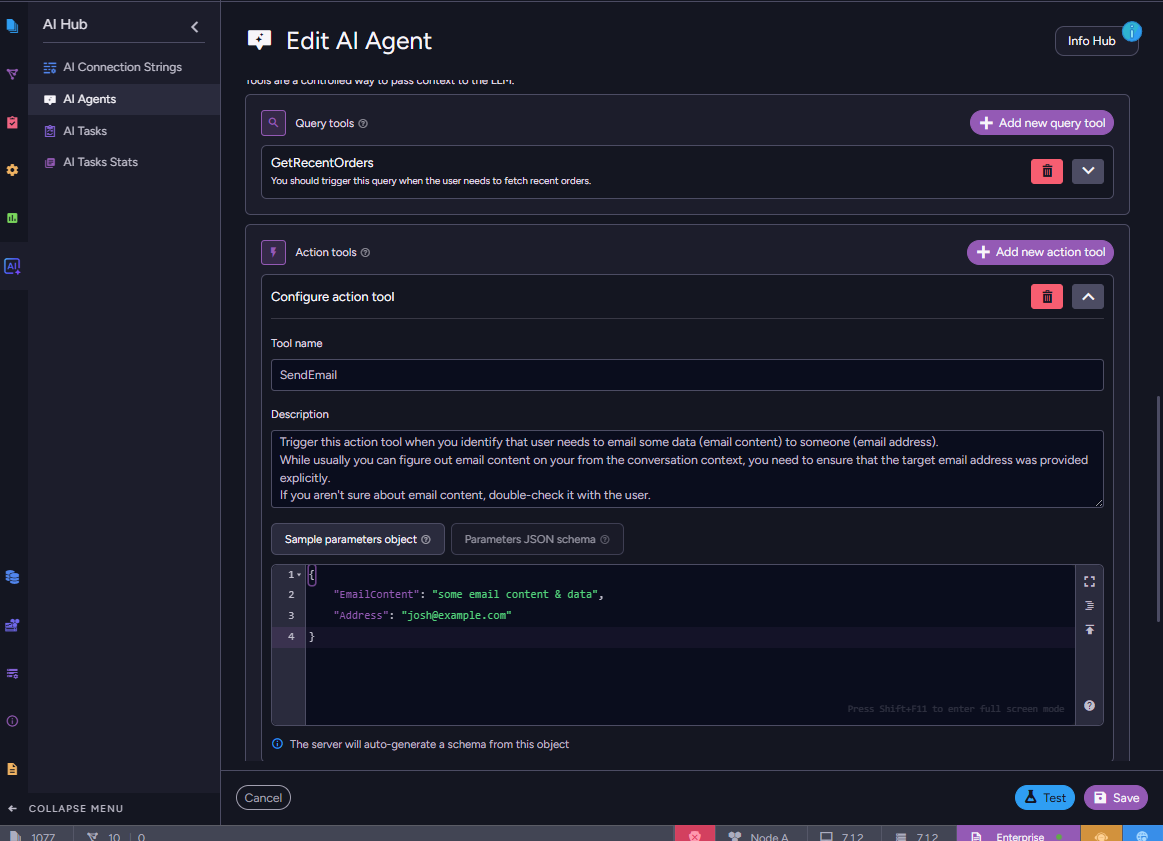
Now, the agent will send a special message every time the Action tool is called, requesting action to be taken on our application side, and an answer back (if it succeeded, how long did it take, and other relevant details). RavenDB Client provides a convenient API to handle such requests easily:
  var chat = store.AI.Conversation(
      agentId: "orders-manager",
      conversationId: "Chats/",
      creationOptions: ordersManagerConversationOptions
  );

  public record SendEmailArgs(string EmailContent, string Address);

  // Handle SendEmail actions
  chat.Handle("SendEmail", (SendEmailArgs req) =>
  {
      _emailWorker.Send(req.Address, req.EmailContent); // mock
      return "email sent";
  });
Let’s give it a try by forcing it to use both the query and action tools to answer correctly:
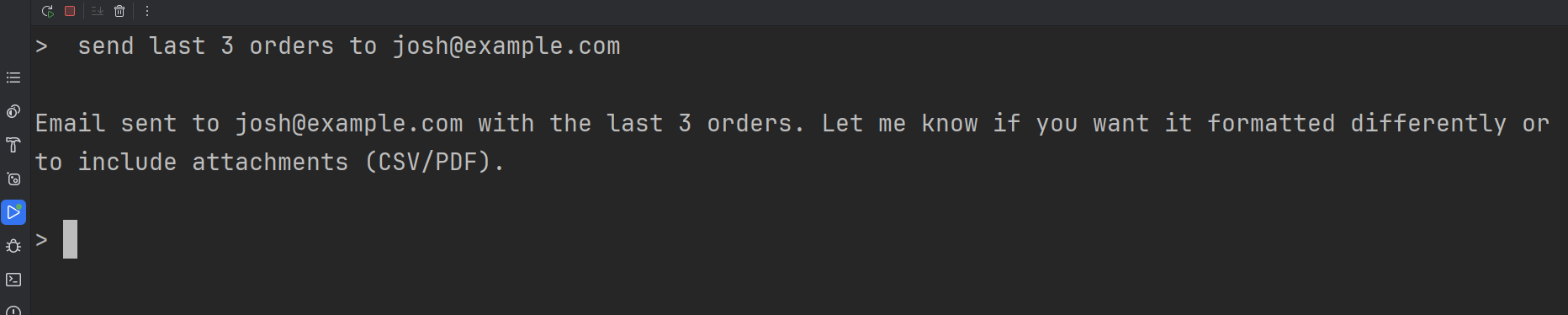
It works. Let’s inspect how it was processed in the RavenDB Studio:
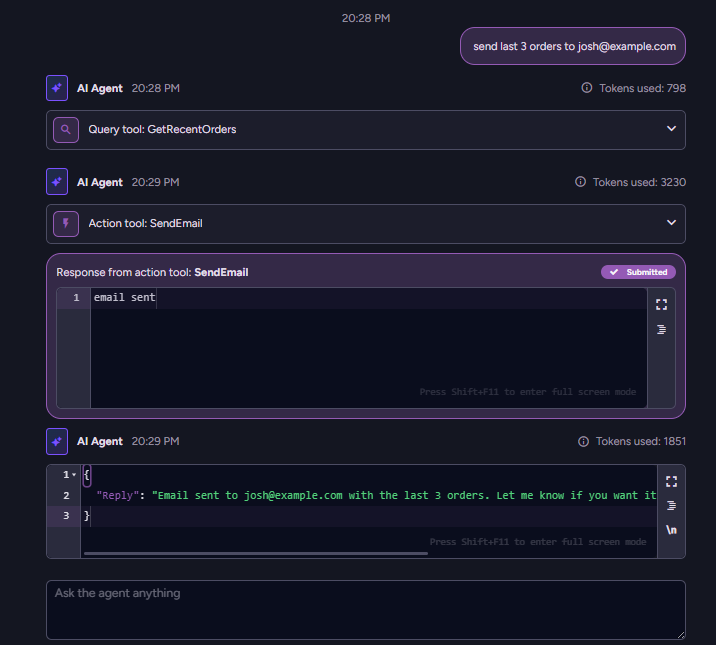
It combined multiple functionalities to provide the best results. Kudos to the developers! 😎
As our users continue to use our agent, the conversation history will continue to expand. LLM doesn’t acknowledge conversation history – all previous messages need to be sent continuously, which can be troublesome for the LLMs with a small context size.
To avoid context-size troubles, you can configure chat trimming. This summarization tool will condense the conversation history into a concise, meaningful summary that will be logically attached to your message instead of the full conversation history. In the studio, select “Summarize chat” as the trimming method, and optionally customize it. We will stay with the default configuration for now:
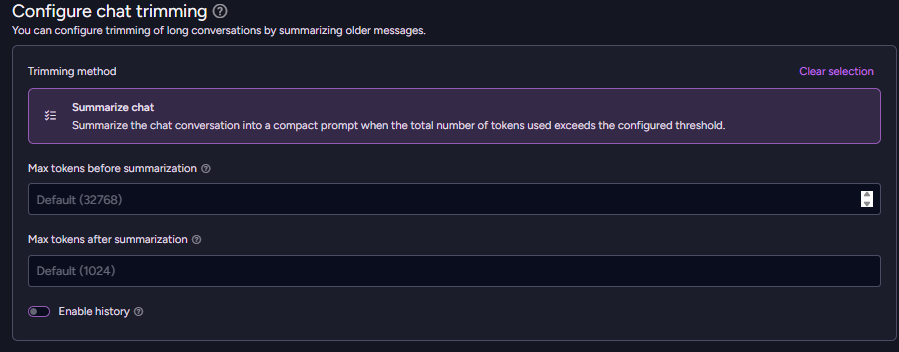
Alternatively, you can do the same thing using the Client API:
  AiAgentSummarizationByTokens summarization = new AiAgentSummarizationByTokens()
  {
    MaxTokensBeforeSummarization = 32768,
    MaxTokensAfterSummarization = 1024
  };

  agent.ChatTrimming = new AiAgentChatTrimmingConfiguration(summarization);
Thanks to that, we can rest assured that our model won’t waste precious tokens trying to process large amounts of data within its context.
What if we’d like to change the model? Let’s assume that OpenAI suddenly becomes 5 times more expensive. This is a valid point for considering another LLM provider. We can do that by creating a new AI Connection String (like in the beginning) that points to a new provider, and just edit the existing agent configuration:
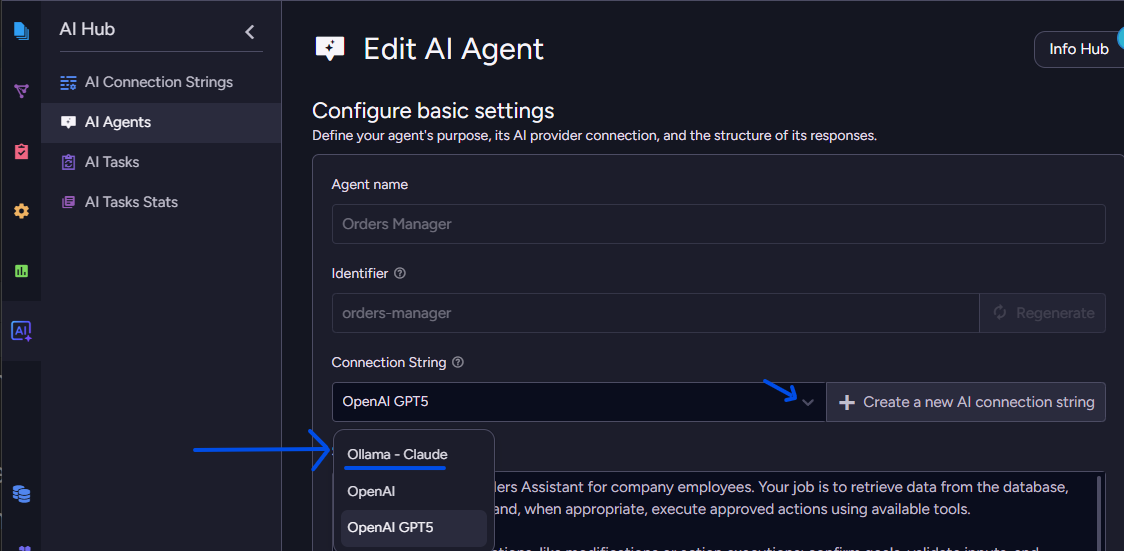
Everything’s set. Just see how simple it is. Everything lives in a database, while you’re just connecting to the final result – a working & customized AI Agent!
Try it yourself, share your thoughts
We could improve this AI Agent with a variety of capabilities, queries, and tweaks – but let’s stop here, as you can simply get the code from here, and try extending it yourself!
Download RavenDB and grab your developer license. If you have any insights or feedback on this feature, join our Discord chat and share your thoughts. The invitation link is here. Enjoy!
FAQs
Why is building an AI agent for an application more complicated than just using a simple chat prompt?
Building an AI agent at scale is challenging because it requires managing multiple independent conversations, storing and trimming conversation histories, securely connecting to various LLM providers, and ensuring the agent is restricted from making unsupervised, harmful decisions.
How does RavenDB simplify the process of creating AI agents?
In the 7.1.2 update, RavenDB simplifies development by shifting the responsibility of hosting and maintaining the AI agent from the application to the database layer. It removes the heavy lifting by managing conversation states and handling safety rules natively, allowing developers to focus purely on agent functionality.
How does RavenDB ensure that AI agents act safely and don’t perform unauthorized actions?
RavenDB makes agents safe by design by ensuring that every action the agent can take is explicitly defined by the developer, not the LLM. To prevent unpredictable behaviors (like accidentally deleting a database), developers restrict the agent’s capabilities using designated Query tools for safe reads and Action tools for external operations.
Woah, already finished? 🤯
If you found the article interesting, don’t miss a chance to try our database solution – totally for free!