Survive the AI tidal wave with RavenDB & GenAI
Highlights
- Use RavenDB GenAI to process, summarize, and update documents directly inside the database.
- Add AI-powered support workflows without building custom AI pipelines.
- Combine GenAI with automatic embeddings to make app data searchable by meaning.
The Surge
Over the last few years, we have seen a shift in our software landscape. Architecture patterns are dynamically changing, new protocols like MCP are popping up, and how code is written has evolved. It’s all driven by the new business requirements, often exceeding just adding a few new QoL functions, forcing us to rethink how we design systems.
Of course, yet again, the reason behind that is the AI, a tidal wave no one can stop. The opportunity AI models offer cannot be ignored. Developers are shifting their data flows to take advantage of it.
AI has made new, amazing things possible, like self-driving cars or autonomous agents. However, it can also significantly enhance the experience of existing applications or reduce the amount of manual work. It can process and understand the data that usually would need human intervention.
This way, AI enthusiasm went to the moon. It’s very accessible – to embrace the AI era, you just ship it, right? You connect the AI model to the right place in your application codebase, and that’s it, right? In the big picture, yes, it is!
But in reality, it’s so simple only in abstract high-level system design. The real fact is that AI isn’t simple. For decades, it was a separate branch of computer science. The engineering know-how behind it started to spread super-quickly, yet still very recently. It requires specialized knowledge, skills, approaches, and tools, which are in demand more than ever.
AI isn’t that trivial
Tempted by its power, companies let developers dive into the world of embeddings, LLMs, tokens, quantization, and so on. This whole new world (at least to most of us) holds nuances and know-how with its learning curve.
Understanding it is just a first step. Then, you need to ship it. It requires a few new pipelines, revising existing ones, and extensive R&D.
But the question is:
>> Do I need to do all this R&D and build another custom solution? To just use AI in my application?
RavenDB deconstructed that question, rethinking where AI belongs in the tech stack of the system.
Everything stays in the database
RavenDB takes the burden of AI off your shoulders, keeping all AI data logistics at the database level in an all-in-one solution. Matter-of-fact, groundbreaking change? You don’t need to rebuild anything mentioned earlier!
The surge for building custom AI solutions is no longer needed. Basic prompting skills are enough. You can take advantage of the AI opportunity and empower your system in any way imaginable, with almost no work around it. Everything stays in the database!
One of our new tools is a powerful RavenDB GenAI feature. It’s super easy to set up and requires minimal coding to work. You just define the context, write a prompt, and it works, without leaving the RavenDB Studio. Any developer can set it up ridiculously fast.
It’s not just an AI connector; it’s the entire process, complete with a ready-to-use template. It reads, processes, and updates documents you attach it to. It can even be configured to re-process documents upon changes, letting you create intelligent processes. You can use any model, even offline ones, so when ChatGPT goes down, you’re still up.
In this article, we will introduce you to GenAI. We will show you how easy it is to set up and inspire you on how broad its usage can be. We will use an example from our demo, Intelligent Support Desk.
Part 1: Application
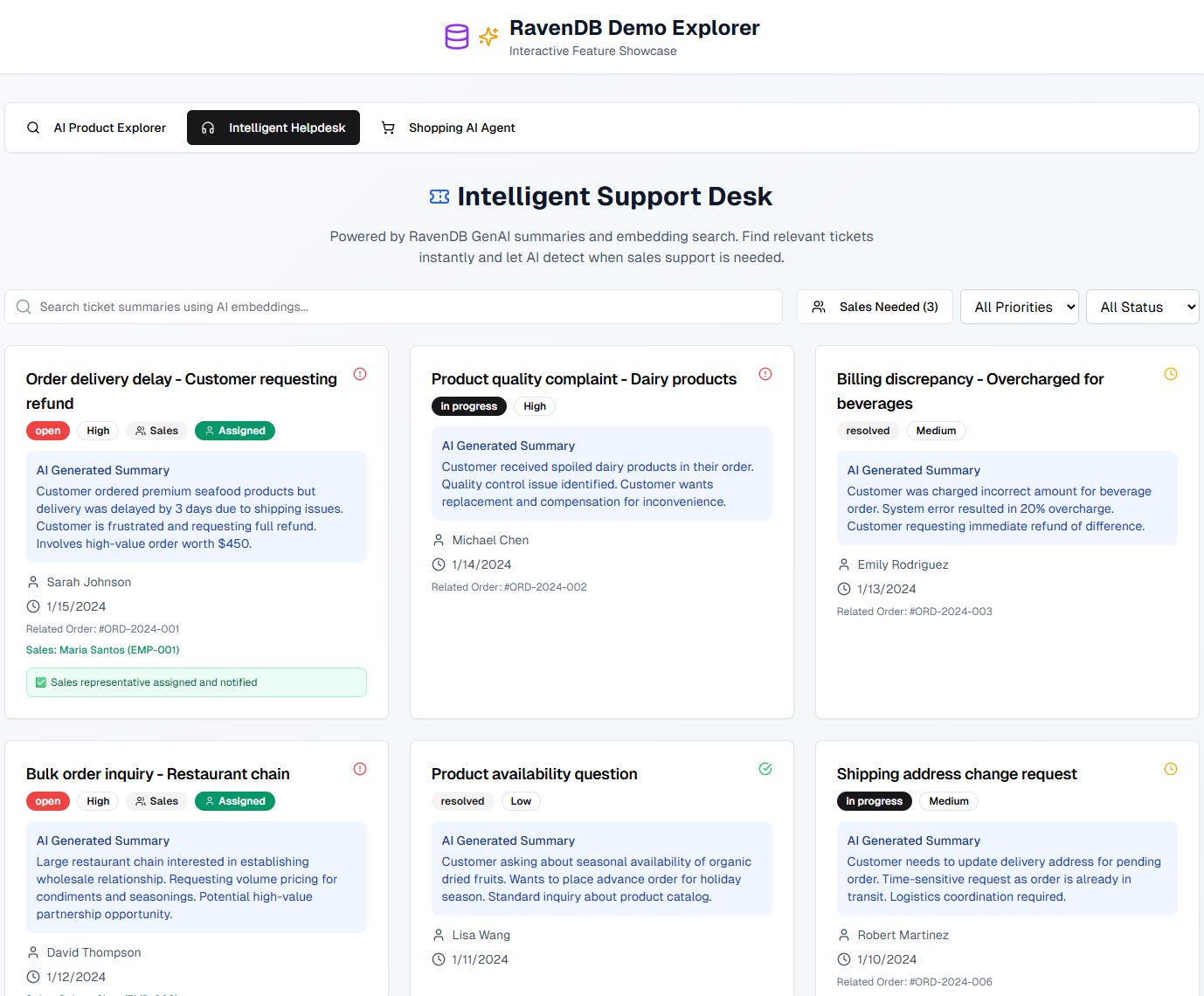
Quick and quality support is essential in a business flow, but it requires well-defined prioritization that differentiates “ASAP” from low-priority tickets, proper escalation procedures, and good searchability. Analyzing a pile of issues can be very time-consuming: it involves reading the conversation, understanding the problem, assigning a priority, and assessing whether there’s a need for escalation.
While this job is easy and boring for humans, ordinary scripts could never handle such a task. There are too many variables that depend on the human factor.
To enhance this process and supercharge our app, we have used two RavenDB AI features. We employed GenAI to understand each issue, assign the priority, summarize the ongoing conversation state, and automatically escalate it to sales if it meets the escalation criteria. This way, helpdesk agents can focus on solving issues first, while sales can easily see only the issues that need their intervention.
The second feature used here is automatic embedding generation, making all tickets semantically searchable by their content or “meaning, ” not just words, to help users dig out knowledge from the past issues, even the most ancient ones. Using RavenDB eliminated the need for almost any code to be written to achieve that.
Most importantly, it requires almost no code to ship.
Let’s see how it works:
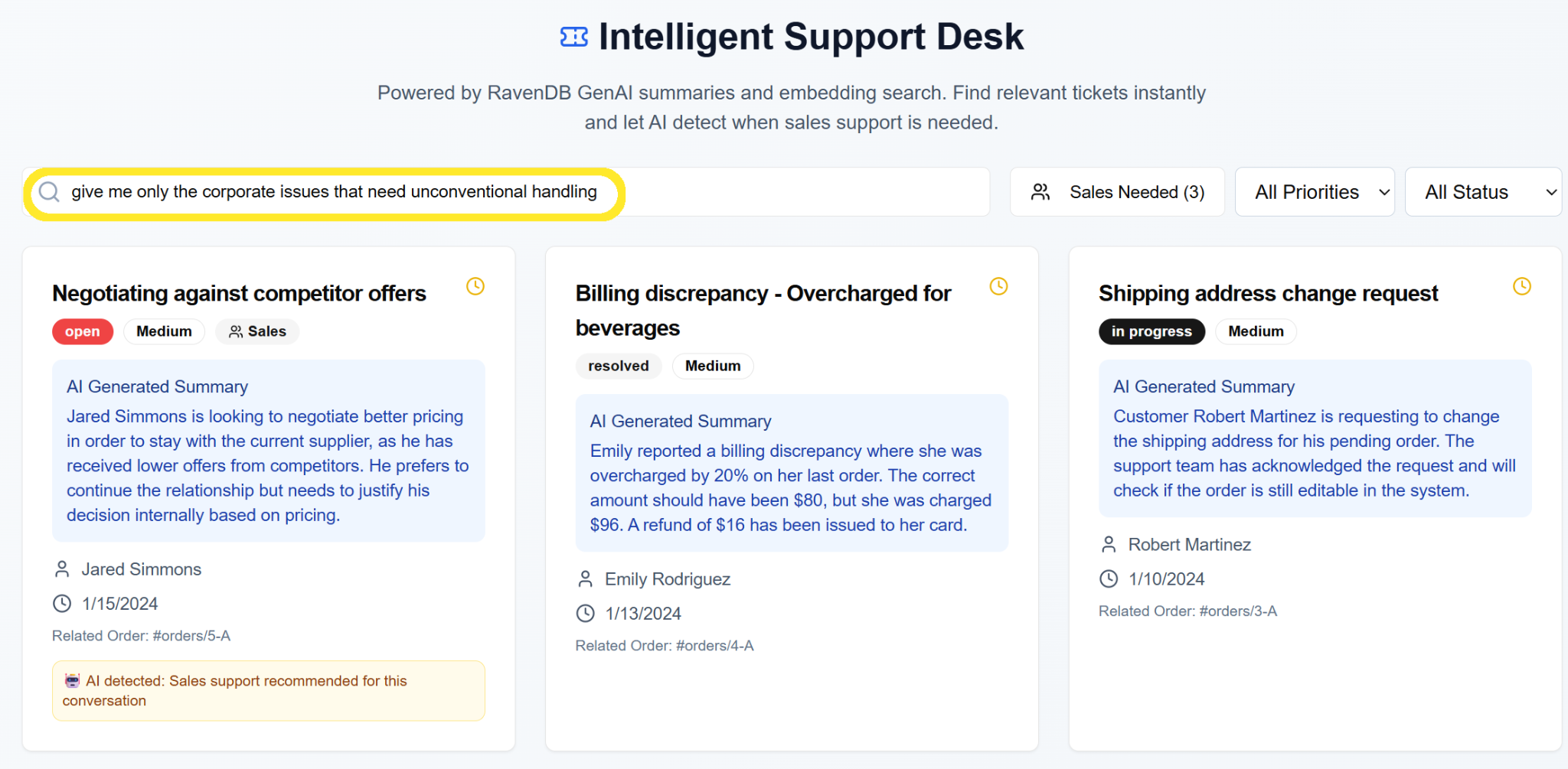
AI search gives us the power to query by meaning, rather than just by tags or exact phrases, so we can quickly receive the tickets we seek without guessing the keywords. The application summarizes the current ticket state, so we don’t need to read the whole conversation to figure out what’s happening. Additionally, all tickets are automatically prioritized and escalated, following the rules we defined.
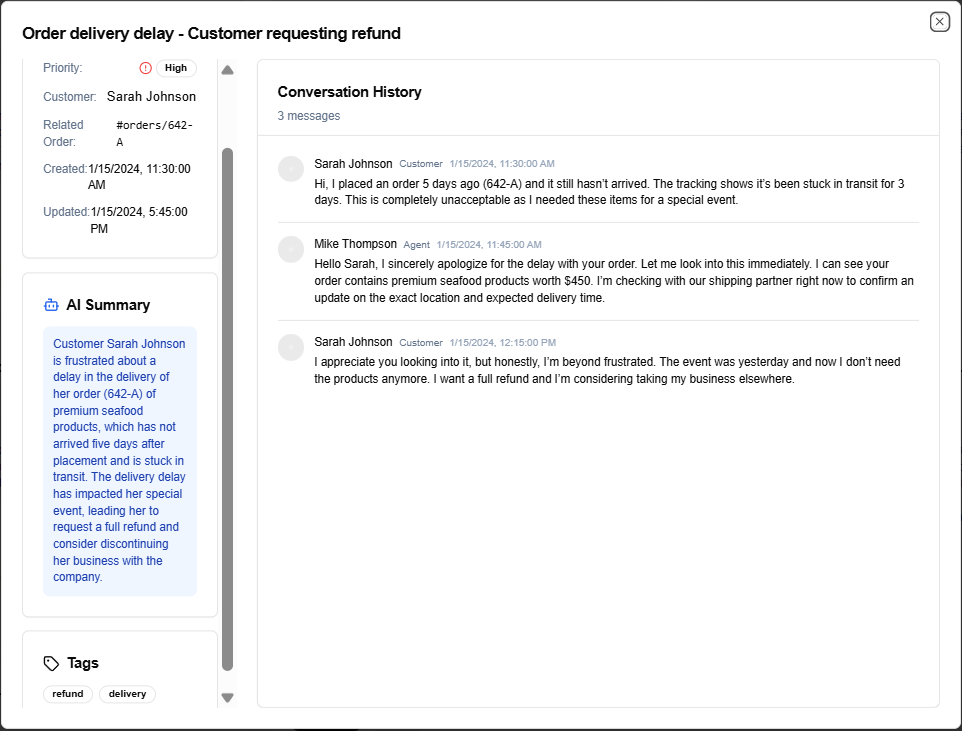
But how does it work under the hood? Let’s dive into it.
Part 2: How it works?
Here’s the link to the application repo for the code-curious readers: https://github.com/poissoncorp/ravendb-demo-explorer
App breakdown
Our application views tickets, so we need to get them somehow there.
The tickets have the following schema:
  HelpdeskTicket {
    id: string
    title: string
    summary: string
    customer_name: string
    priority: "high" | "medium" | "low"
    status: "open" | "in_progress" | "resolved"
    created_at: string
    updated_at: string
    order_id?: string
    needs_sales: boolean
    conversation_history: ConversationMessage[]
    tags: string[]
  }
To do that, we’ve made a simple query:
  export async function getMatchingSupportTickets(query: string): Promise<HelpdeskTicket[]> {
    const session = documentStore.openSession();
    try {
      const rawResults = await session
        .query<any>({ collection: "helpdeskTickets" })
        .vectorSearch(
          x => x.withText("summary").usingTask("generateEmbeddingsForSummaries"),
          factory => factory.byText(query)
        )
        .all();

      return rawResults.map(mapToHelpdeskTicket);
    } finally {
      session.dispose();
    }
  }
In the big picture, it’s just fetching tickets to your browser. We’re trimming the data here a bit, but that’s a UI-related technical detail. As you see, it’s using vector search already. We’ll cover that later.
Returning to the ticket, as you might have seen in the schema, it has a summary, priority, and needs_sales flag. It’s prepared to be fulfilled not by humans but by AI.
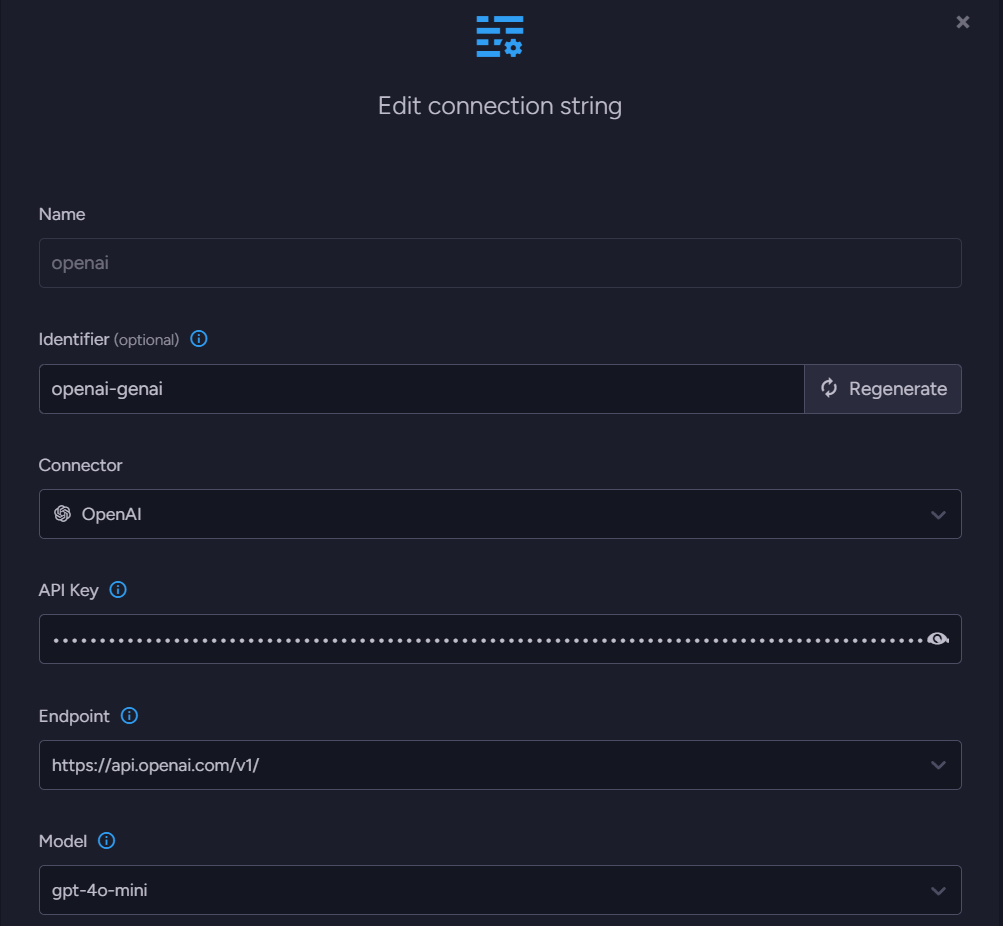
To achieve that with RavenDB, first, we created an OpenAI connection string to the LLM so we could use it and the new task.
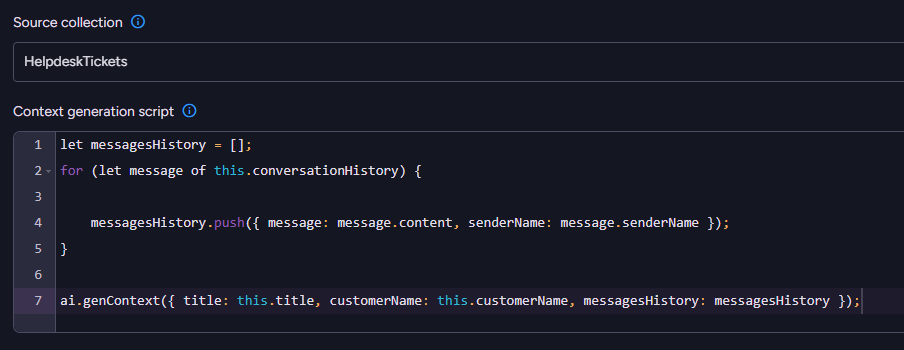
Then, while creating a task, we needed to define which collection (HelpdeskTickets) would be processed, and the context we want to give to the AI, to help it understand the job it’s dealing with. We wanted to provide the conversation history to the model so it knows what’s happening inside. Still, it also needed to be provided with the customer’s name to differentiate customer messages from the support team. Ticket title can also be helpful; it’s another bit of information to understand the issue entirely.
We wrote a script that collects all this data from our document, based on a helpful template available in the (i) pop-up:
In the wizard’s next step, we provided AI with two crucial things: a prompt and an output schema in which we wanted to receive data from the AI. The prompt is written in natural language (English in our case), so you don’t need to write any code here. Our prompt looked like this:
Given the helpdesk ticket details (Title, Sender, and MessagesHistory) provide a brief summary approachable to anyone who wants to know what's the ticket about, and highlighting customer needs. Let's call it "summary".

Also, measure the importance of the issue, assigning "priority":
- low: issue is just a question about availability of products or minor stuff
- medium: there are issues that needs to be resolved or processed, needs manual intervention
- high: the customer is either dissatisfied or has serious problems with our service

Also, assign tags to the issue, if relevant from this list: [refund, damage, question, negotiation, payment, delivery, quality] - let's call it "tags".

Also, indicate if the conversation needs an intervention from one of our sales. Large orders, continuous contracts, negotiations, and pricing should bring set flag "needs_sales" to true. In issues where there's no such sign, set "needs_sales" to false.
As we said, the second significant element is the JSON schema. We can define a sample object here – it serves as an example for AI, showing what response is expected. We selected a sample object, a more convenient approach for individuals less experienced with AI or those who don’t require manual precision:
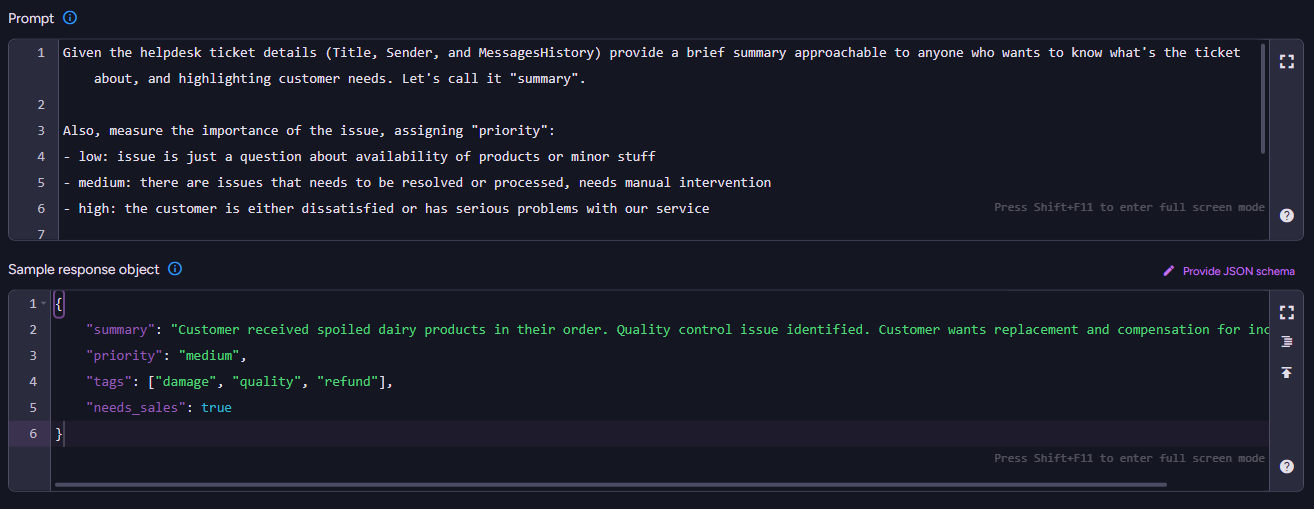
  {
      "summary": "Customer received spoiled dairy products in their order. Quality control issue identified. Customer wants replacement and compensation for inconvenience.",
      "priority": "medium",
      "tags": ["damage", "quality", "refund"],
      "needs_sales": true
  }
On the next page, it asks us about the update script. We already ensured that the data from LLM is ready to use, so we just needed to copy it into the document fields like this, see:
Object.assign(this, $output);After saving, it automatically started generating stuff. A single prompt handled all summaries, priorities, tags, and sales detections. See:
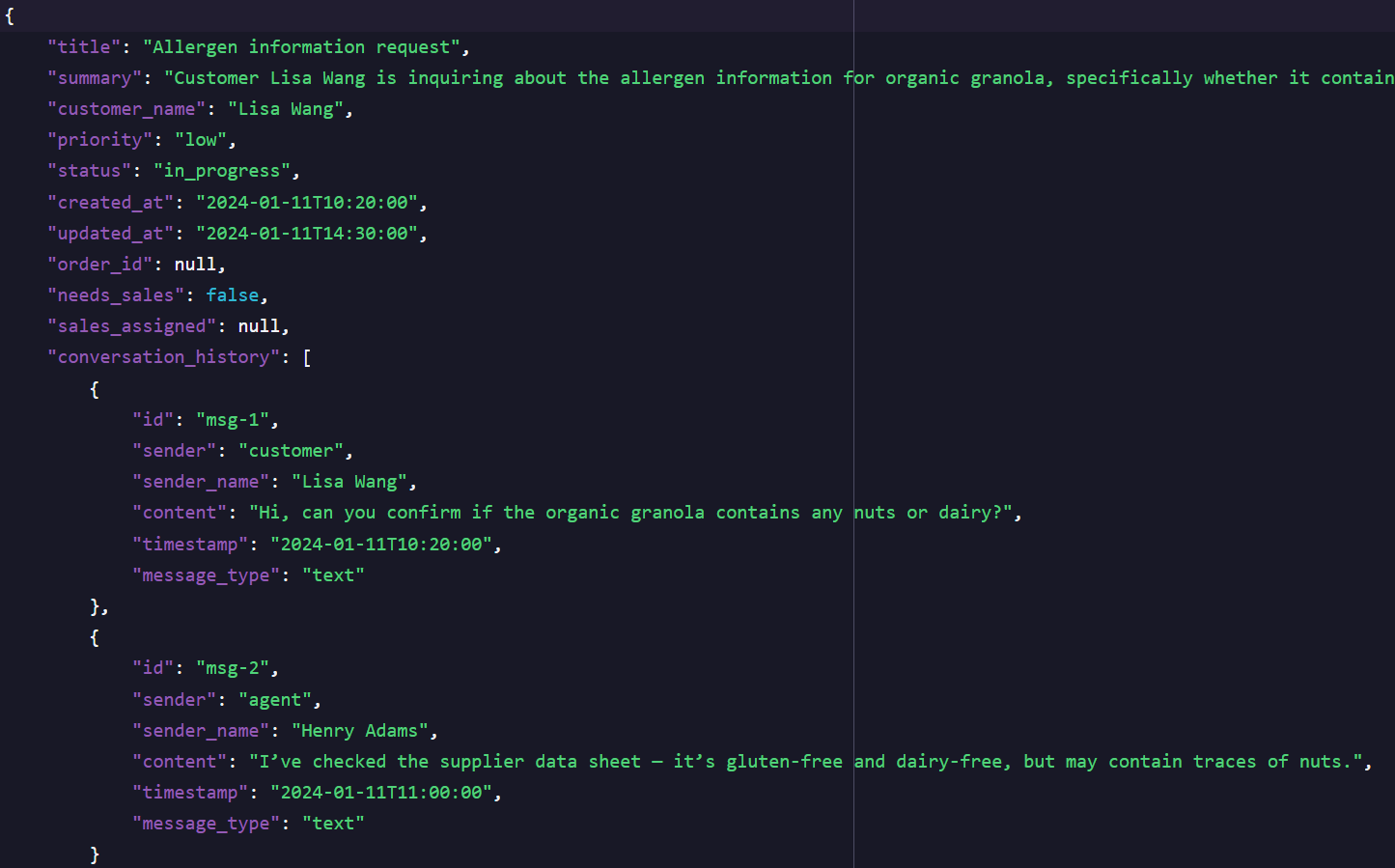
Look how nice it is.
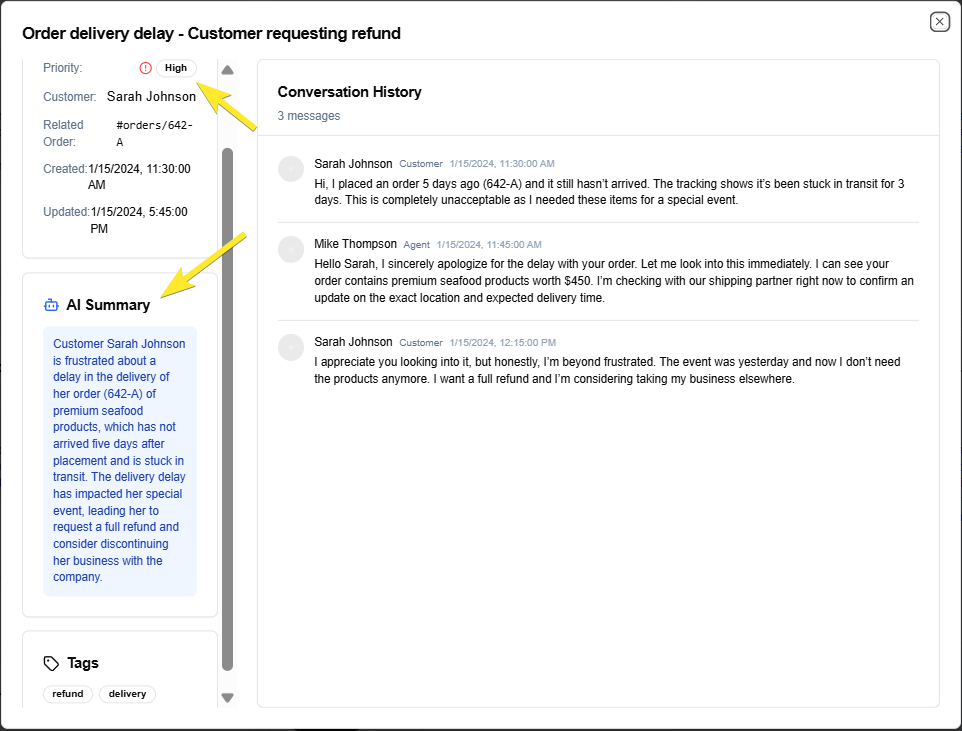
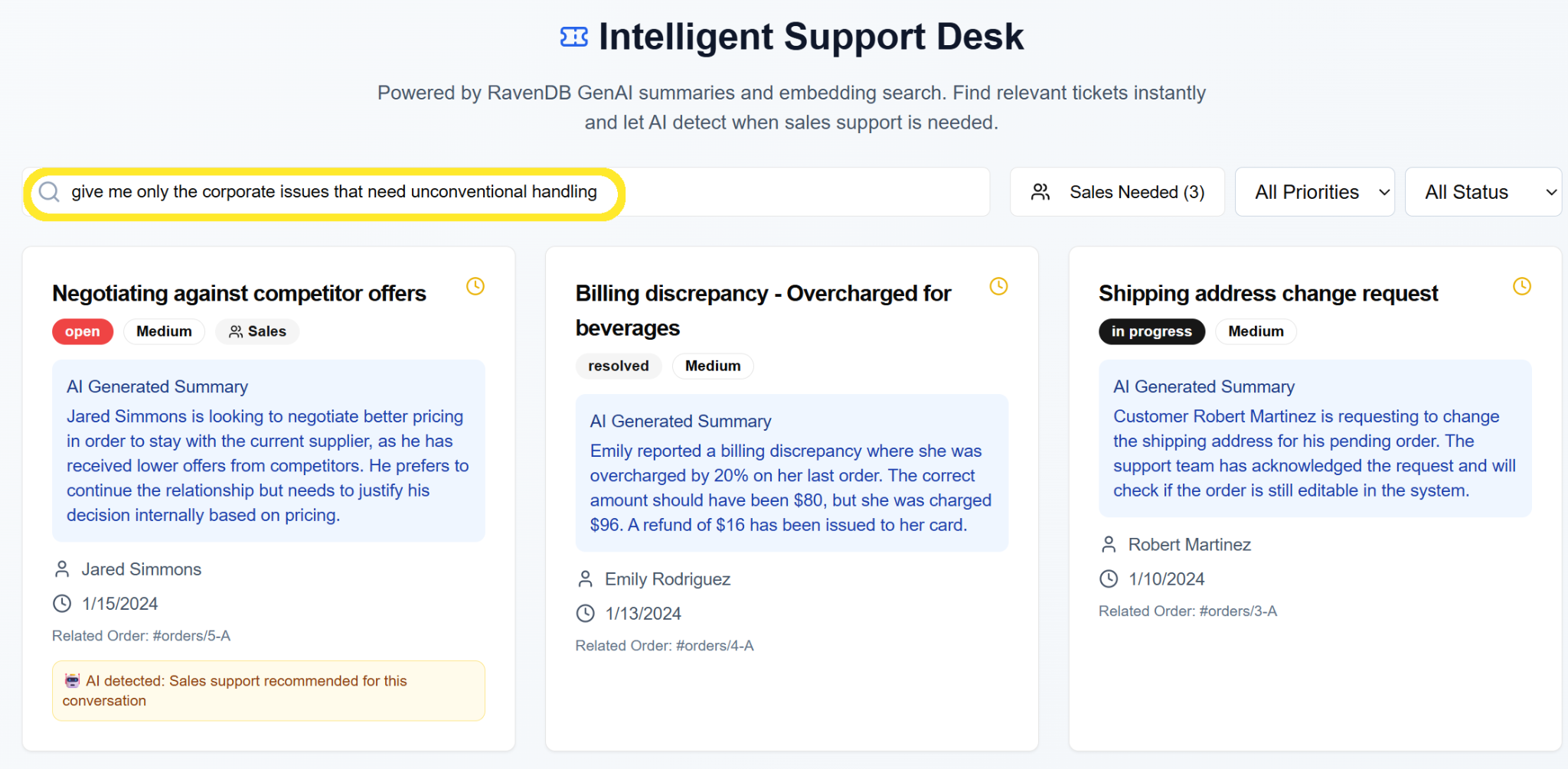
Then we got an idea—why shouldn’t the issues be searchable by generated summaries, not by matched text, but by meaning?
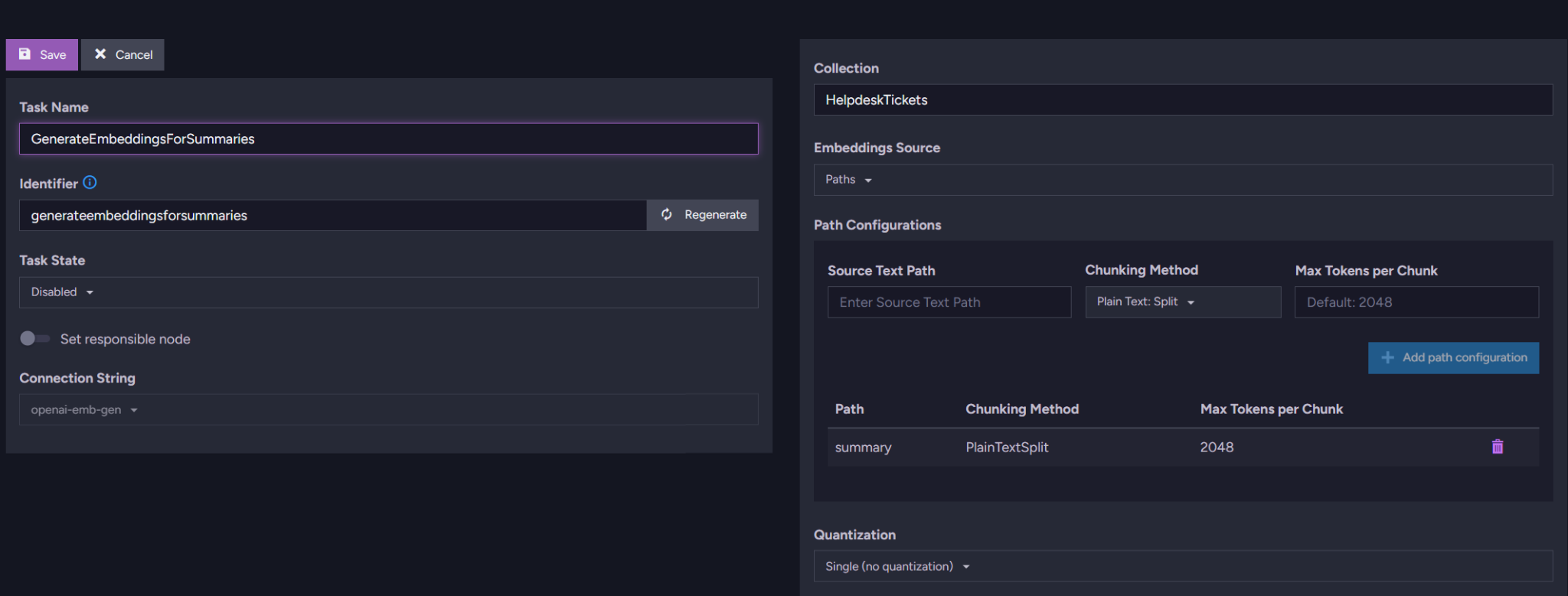
We quickly set up an embeddings generation task on the summary field, which GenAI has generated.
We prepared another OpenAI connection string – now to the embeddings model. See:
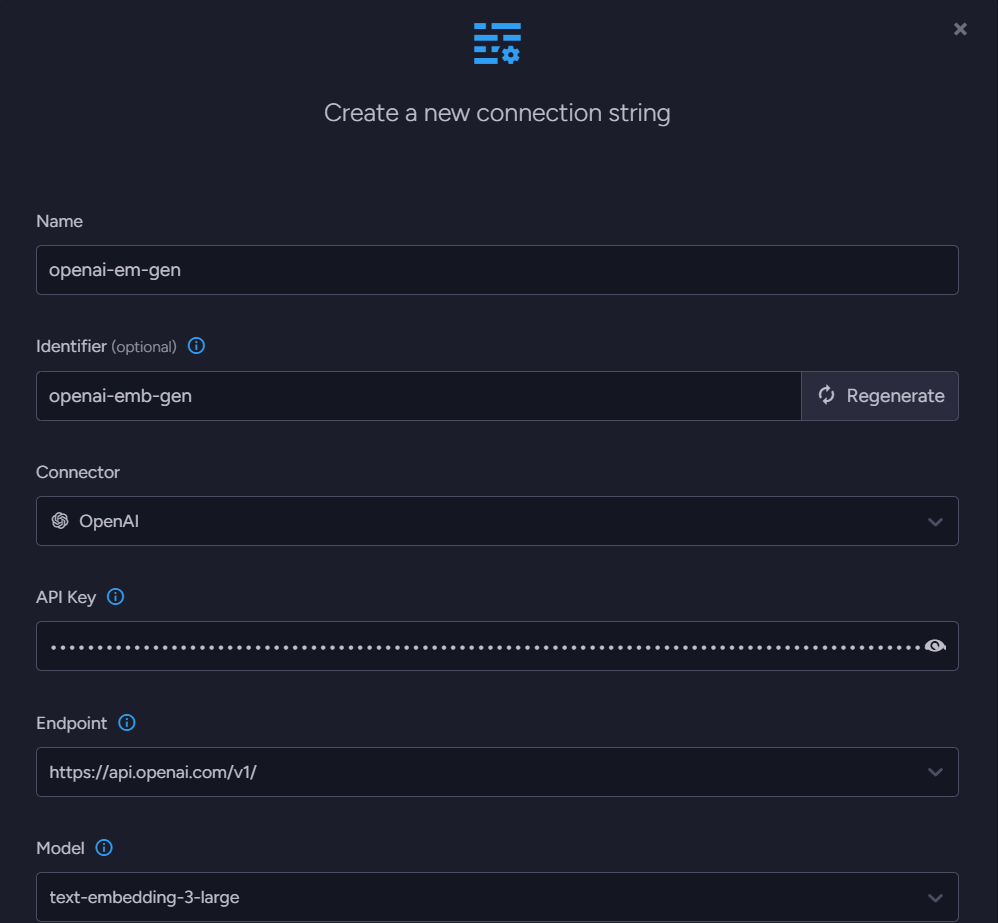
Then we rolled out the second task – this one is for the embeddings generation. Embeddings can be perceived as the numerical representation of the concept/meaning of the text here. The task is also responsible for automatic query terms “translation” and caching, so your costs are kept under control. See the task, we set it up to generate embeddings on the Summary field:
It works! Now, (of course, after UI work, but that’s a detail 😏) we can search by summary meaning!
Building smart, minimum code
The best part is that this requires only the fun part of coding to ship. We used it like a standard AI – define context, write a prompt, and patch the document using an answer, but now it’s automatic. Setting this stuff was as easy as managing a standard RavenDB Ongoing Task, e.g., ETL. You don’t even need to know how AI works, being fair, to do AI with RavenDB’s GenAI. What GenAI with RavenDB gives us is:
- No middleman – GenAI directly connects your database to the chosen AI service, so there is no need for additional code.
- Expecting the unexpected – Even if you don’t know what you might get, GenAI will do its best to help you, following your instructions.
- Support for almost any AI model – Use one of many AI services we support, commercial or open-source
Where to go from here?
If you are unfamiliar with RavenDB, we encourage you to explore what we can do for you. GenAI isn’t our only feature that will make your life easier. Another thing you might be interested in is native vector search or automatic embeddings generation.
If you and your team have gained some free time by letting AI do the work, you may have a moment to chat with us on our Discord. The RavenDB Team and our community are chronically online there. Check out our Discord server.
FAQs
Why should I use RavenDB for AI instead of building custom AI pipelines in my application code?
RavenDB keeps all AI data logistics natively at the database level, acting as an all-in-one solution. This eliminates the “middleman” and the need for complex custom code, allowing developers to empower their systems using just basic prompting skills directly within the RavenDB Studio.
What kinds of tasks can RavenDB’s GenAI feature automate?
GenAI can automatically read, process, and update documents. For example, in a customer support application, it can read a ticket’s conversation history to automatically generate a summary, assign a priority level (low/medium/high), add relevant tags, and flag whether the ticket requires escalation to the sales team.
Do I need advanced coding skills to configure GenAI tasks?
No, it requires minimal coding. You simply configure the task in RavenDB Studio by selecting the collection and fields to provide as context, writing your instructions (the prompt) in natural language, and providing a sample JSON object so the AI knows exactly how to format its response.
Woah, already finished? 🤯
If you found the article interesting, don’t miss a chance to try our database solution – totally for free!